
Bonus Feature · Exoplanets
Plan & Capture Exoplanets
Three Catalogs, One List
Turn each source on or off and Astro PM merges them into a single de-duplicated list of tonight’s transits. Every catalog is cached locally, so the planner opens instantly – and if a source is unreachable, a stale cache still beats an empty screen.
ExoClock
Roughly 750 curated planets with actively maintained BJD_TDB ephemerides, R-band depths, transit geometry, and an observation priority on every target - alert, high, medium, or low - telling you where new timing data is actually needed.
NASA Exoplanet Archive
Around 800 amateur-reachable planets pulled from the roughly 4,700 confirmed transiting worlds - the rest are simply too faint or too shallow. Broader coverage than ExoClock, with planet radius, equilibrium temperature, and system distance carried along.
TESS TOI
TESS Objects of Interest, for observers who want the frontier - candidates and known planets alike. Ephemerides drift fastest here, which is exactly why ground-based timing is worth collecting on them.
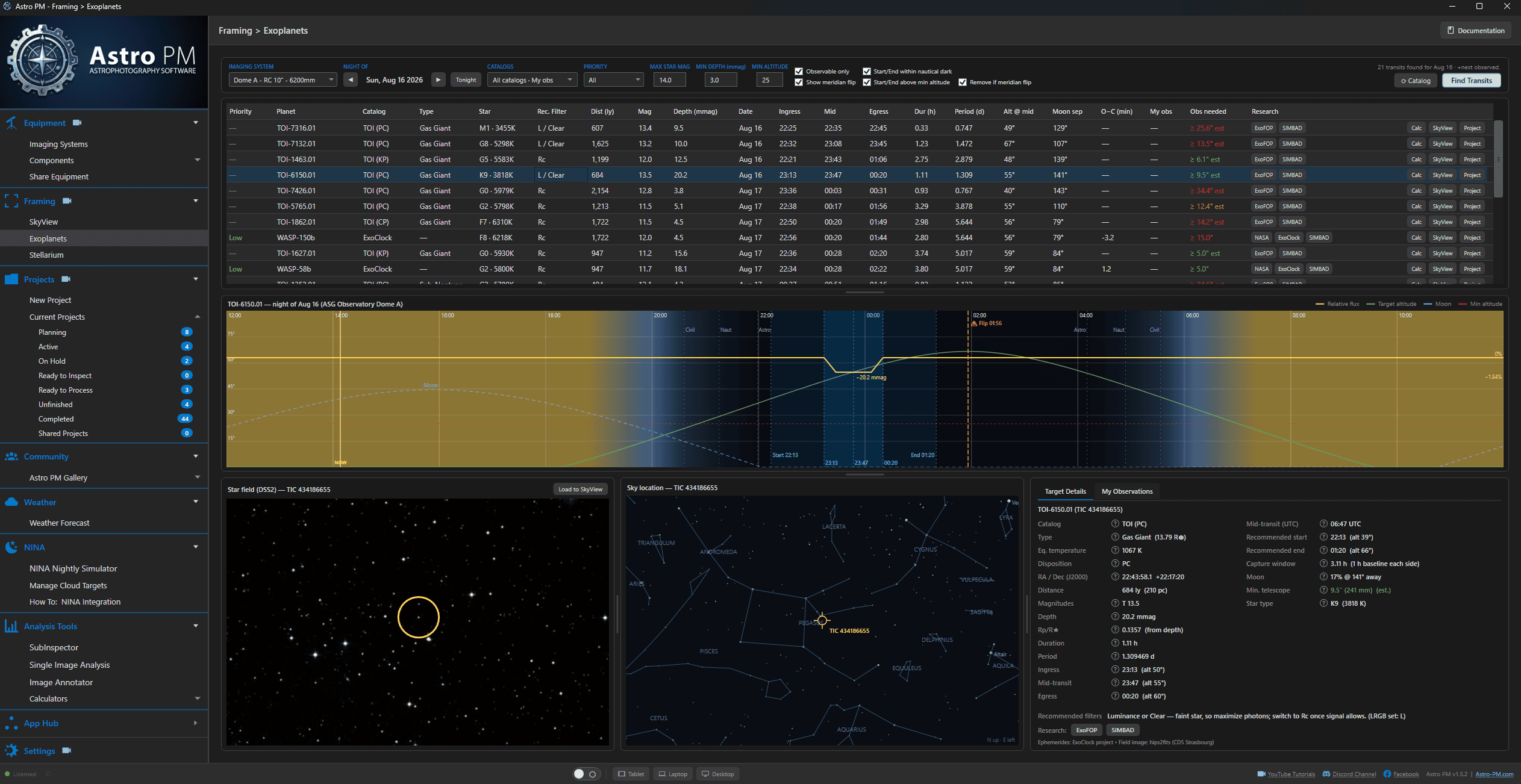
It all starts with an Exoplanet Planner
Quickly pull all of the latest targets from three sources into one easy to read tabular view. Each transit shows a full expected transit graph, transit image, and sky location. Filter your evening targets and start selecting your best target. 3 Catalogs, one easy to use planner
Easy Tabular Data
Filter Exoclock, NASA, and TESS targets in one easy to use table. Star type and data, ingress/egress times, and even recommended scope sizes. Research jumps for each provided
Target Visualization
Check the target graph for easy to view planning. See when meridian flips, dusk, dawn, and depth of transits fit into your scheduled evening.
Imagery & Data
Astro PM pulls in a view of the transit sky, sky location for easy identification, and target details from key catalog sources. Even track and compare your observations when finished to catalog sources.
Will My Telescope Even See It?
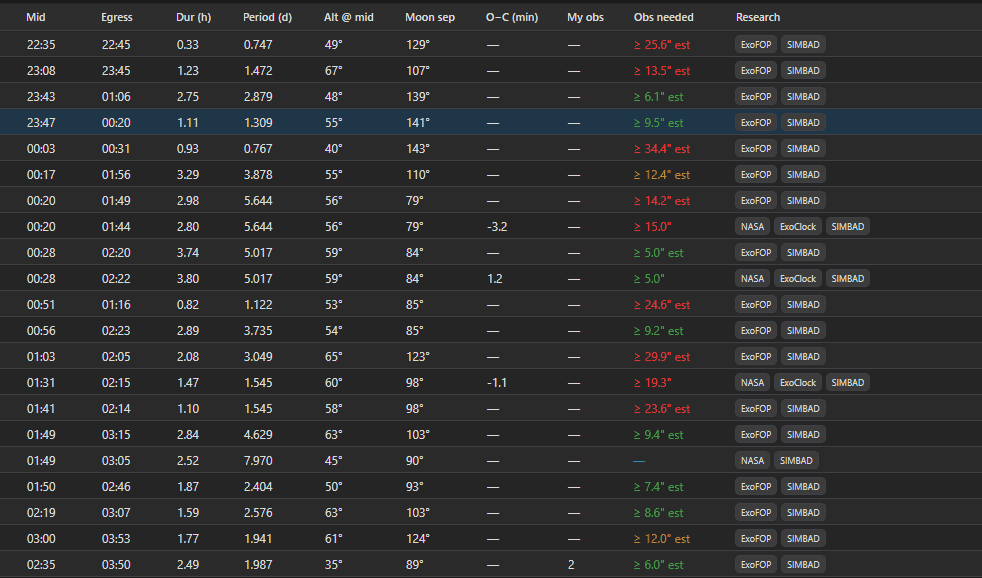
That’s the question that decides everything, and Astro PM answers it in a column. Every transit carries a minimum aperture – computed with ExoClock’s own published model (Kokori et al. 2023) from the star’s brightness, the depth of the dip, and how long the event lasts – and it’s colour-coded against the rig you selected.
Green means your scope can record it. Anything else tells you the truth before you lose a night finding out.
Then narrow the field the rest of the way: observation priority, faintest host star, shallowest depth worth attempting, minimum altitude at mid-transit. Every filter has a sensible default already in place.
Sort by Anything That Matters
Tonight’s transits arrive as a sortable table, every column live:
- The event – ingress, mid-transit, and egress times, duration, orbital period, and altitude at mid-transit.
- The planet – classified by radius from Terrestrial through Super-Earth, Sub-Neptune and Neptune-like to Gas Giant, with distance in light years.
- The star – spectral class estimated from effective temperature, magnitude, and moon separation for the night.
- O−C – how far recent observations have drifted from the predicted timing, in minutes. This is the number that says a planet needs watching.
- Recommended filter – photometric R Cousins as standard, Luminance when the star is too faint for filtered work, Ic as the alternative on cool red hosts.
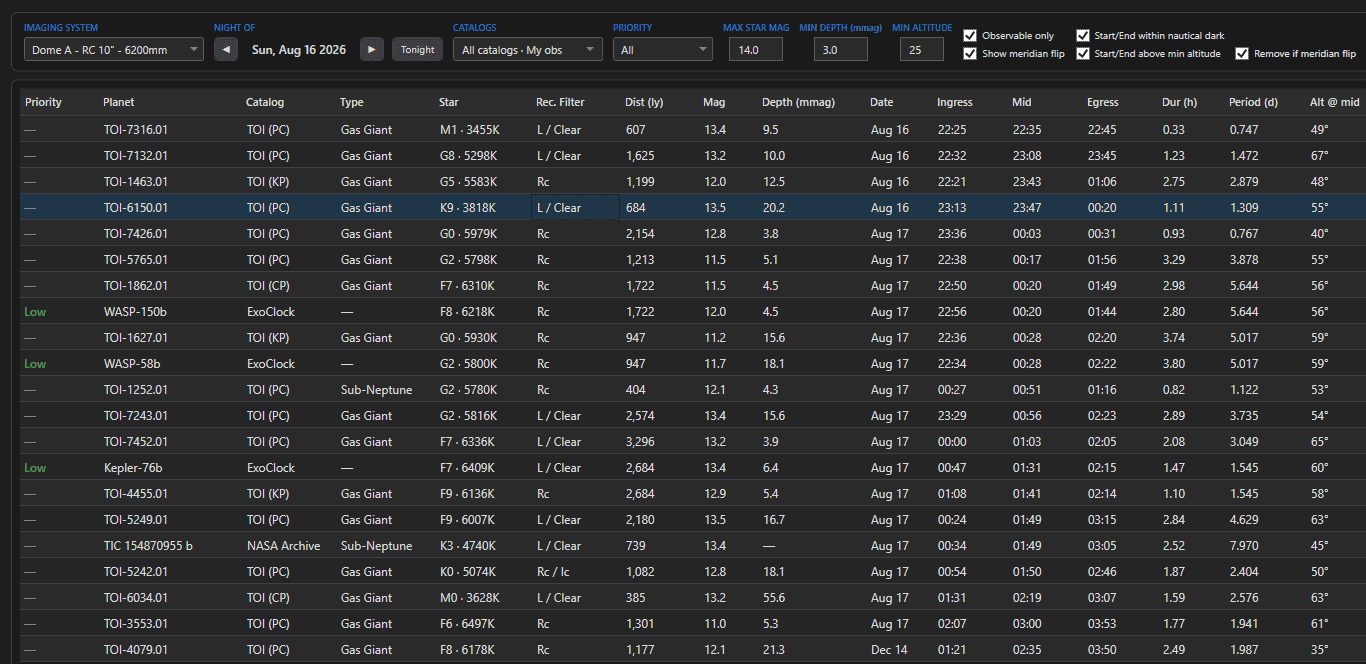
Every row links straight out to NASA’s catalog page (or ExoFOP for TESS candidates), the ExoClock database, and SIMBAD – and opens the target in the Exposure Calculator, in SkyView for framing, or as a new project, prefilled.
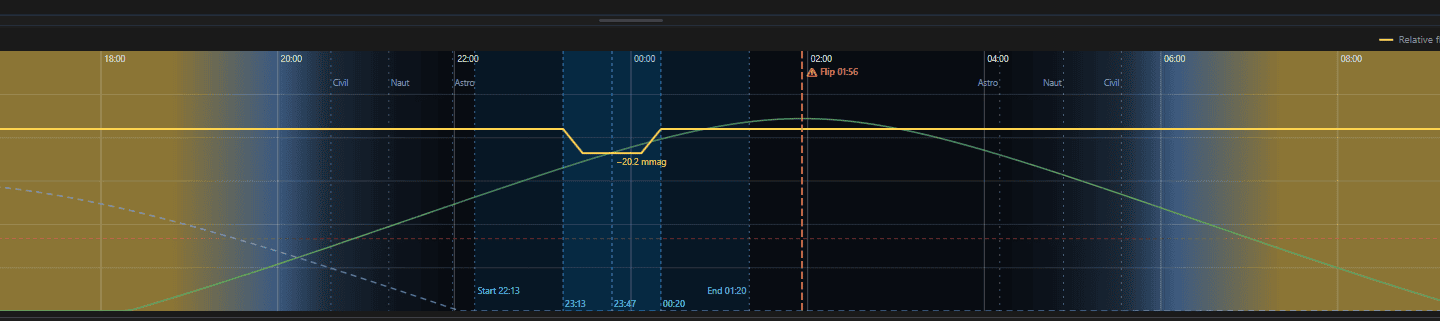
The Whole Night, Drawn
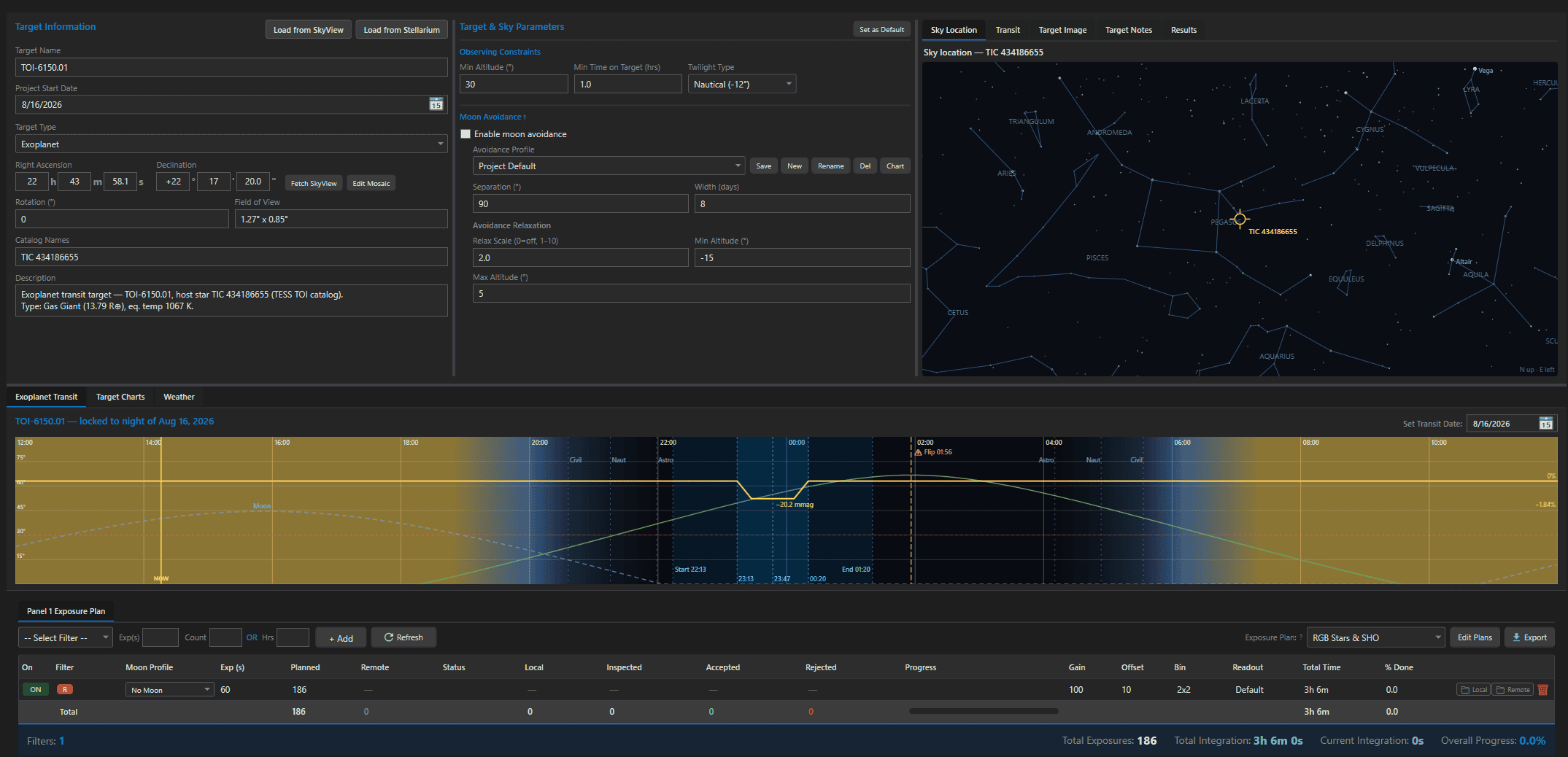
Select a transit and the timeline draws the night noon-to-noon: twilight gradient in the background, your target’s altitude curve, the moon’s altitude labelled at its peak, and a dashed red line at your minimum altitude.
Over the top sits the event itself. The capture window is shaded – faint across the baseline hour either side, brighter through the transit – with contact markers at ingress, mid, and egress, and the predicted light curve drawn as a scaled dip whose flat bottom is computed from the real transit geometry, not a generic shape.
Meridian-flip markers warn you where a German equatorial would interrupt the run, and a NOW line tells you where you are. It’s the same chart in the planner and inside the project, drawn from the same stored ephemeris.
A Project Panel Built for Photometry
Press Project on any transit and Astro PM builds it – coordinates, catalog data, equipment, and the full ephemeris stored on the project itself, so every view can compute upcoming transits without going back to the network.
The project gains its own Exoplanet Transit tab with the same night timeline, plus a Set Transit Date control that locks the project to one specific night. Lock it, and the chart, the Transit tab, the project card, and the scheduler all follow that single event.
The recommended capture window is ingress minus one hour to egress plus one hour – the baseline standard ExoClock and the Exoplanet Transit Database both expect.
Fully Automed Into NINA for Scheduling
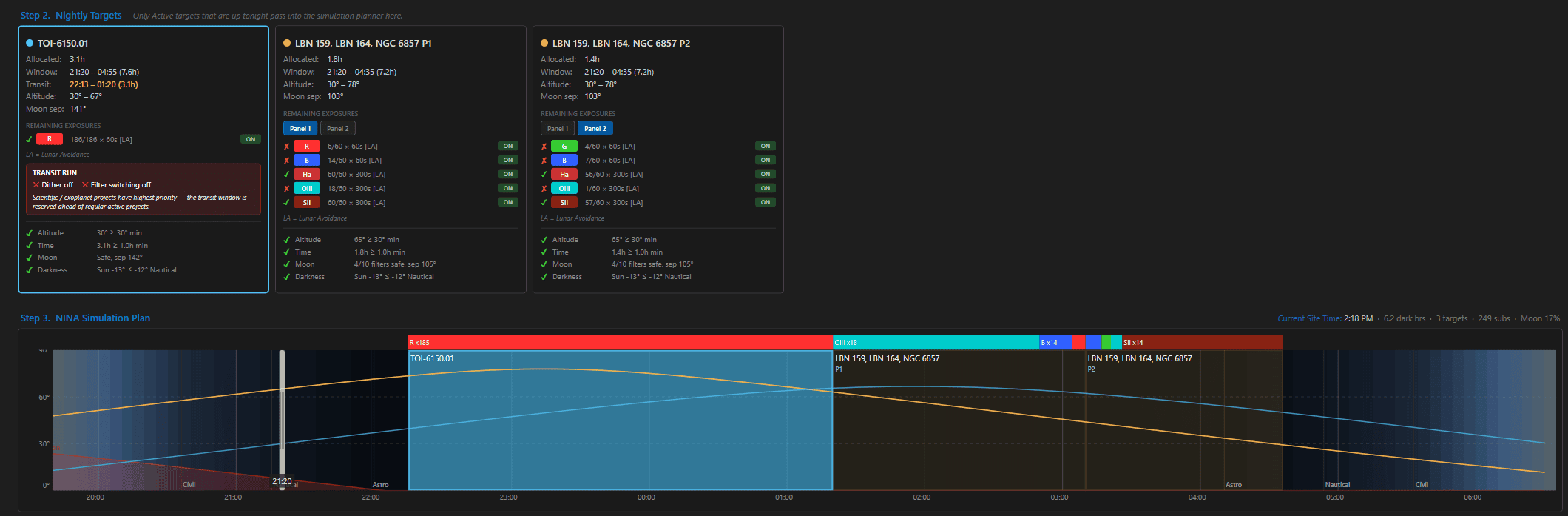
A transit doesn’t wait for your nebula to finish, so the Astro PM N.I.N.A. plugin doesn’t ask it to. Before any other scheduling decision is made, an exoplanet project with a transit tonight claims and locks its capture window – and the entire rest of the night is planned around it.
The plugin runs a verbatim port of the desktop’s ephemeris math, so what the Simulator shows you at dusk is exactly what executes at the mount.
1. Claimed First
Every five-minute slot inside the capture window where the target clears your altitude limit and darkness threshold is claimed and locked before any other target is scheduled. Those slots are never borrowed, never pruned, never reassigned.
2. Captured Cleanly
A transit run is a continuous single-filter time series, and the scheduler treats it as one. Filter batching is switched off, and dithering is suppressed for the whole window - a dither would punch a gap in the series and move the star off its pixels.
3. Handed Back
Because the window was reserved rather than improvised, the hours either side were always someone else's. Egress passes, the lock ends, and your deep-sky targets carry on exactly as scheduled - no orphaned sequence, no intervention.
One sequence. One night. Science and astrophotography from the same clear sky – and you were asleep for all of it. See how the N.I.N.A. integration works →
Bring Your Results Home
Reduce the night in HOPS or EXOTIC, then drop the output into the project’s Results tab. Astro PM parses it and files it permanently – and finds your fitted light-curve plot sitting next to the results file automatically.
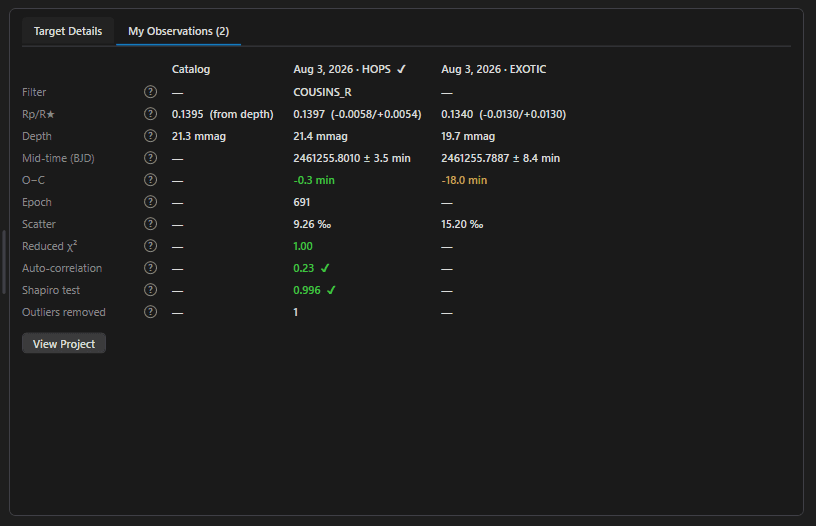
What it reads back out is the science, not just the file: fitted radius ratio with uncertainties, transit depth, mid-transit time with its error in minutes, epoch, and O−C against the catalog ephemeris.
Alongside those sit the quality metrics ExoClock actually grades submissions on – residual scatter in parts per thousand, reduced chi-squared, autocorrelation and Shapiro tests, outliers removed – each marked with a tick or a warning so you know whether the run is worth submitting before you submit it.
Measured Against the Catalog - and Against Yourself
Every observation you file becomes a column. The planner builds a comparison table for each planet you’ve measured: the published catalog values down one side, then one dated column per observation, newest first.
Watch your own depth and mid-time measurements line up against the literature. Watch your O−C values scatter – or drift. Observe the same planet across seasons and the pattern is right there in front of you, because the app kept every run.
Switch on My observations and the planner always surfaces the planets you’ve already worked on, each showing its next matching transit – even when that falls months from now.
Then Share It Where It Counts
Amateur transit timings genuinely matter. Ephemerides drift, and professional facilities need to know when a planet will actually transit before they commit time to it. Your night’s work can be part of that.
Publish to the Astro PM Gallery
Share the result the same way you share a finished nebula. Exoplanet and photometry projects file themselves under Scientific automatically, carrying your equipment, filters, and exposure totals with them.
Ready for ExoClock, NASA & Beyond
Astro PM works in HOPS and EXOTIC output - the formats ExoClock and NASA's Exoplanet Watch already accept - and checks your run against the same quality metrics they grade on. Every target links straight to its ExoClock, NASA, ExoFOP, and SIMBAD pages, so contributing is a step, not a project.
Measure a planet tonight.
Exoplanet planning is built into every copy of Astro PM – no add-on, no separate tool, no new sequence to learn. Download the free trial and find out what else your telescope can do.