N.I.N.A. Simulator & Instructions
Astro PM bridges the gap between planning and execution through a direct cloud integration with N.I.N.A. Plan your projects, sync them to the cloud, and let the Astro PM plugin schedule and image your entire night — automatically.
Build your projects in Astro PM with target coordinates, mosaic layouts, rotation, and detailed exposure plans for every filter.
One click pushes your projects to the Astro PM cloud — coordinates, rotation, mosaic panels, and full exposure plans travel together.
The Astro PM plugin automatically schedules your entire night — best-fitting targets to your imaging window based on altitude, moon, and remaining exposures.
All your targets and exposure plans are honored automatically. The plugin handles target switching, filter changes, and mosaic panels — you just hit start.
A dedicated N.I.N.A. plugin that allows you to fully automate your ‘Active’ targets. Imagine working in Astro PM on your desktop, setting up targets, exposure plans, and it just works on your remote rig!
Simulate the evening runs with one click… the scheduling engine honors all your altitude and exposure plans. Lunar avoidance per filter, and prioritizations all happen seamlessly. no need to even open NINA, it will simply grab the data from the cloud and run the simulation each evening.
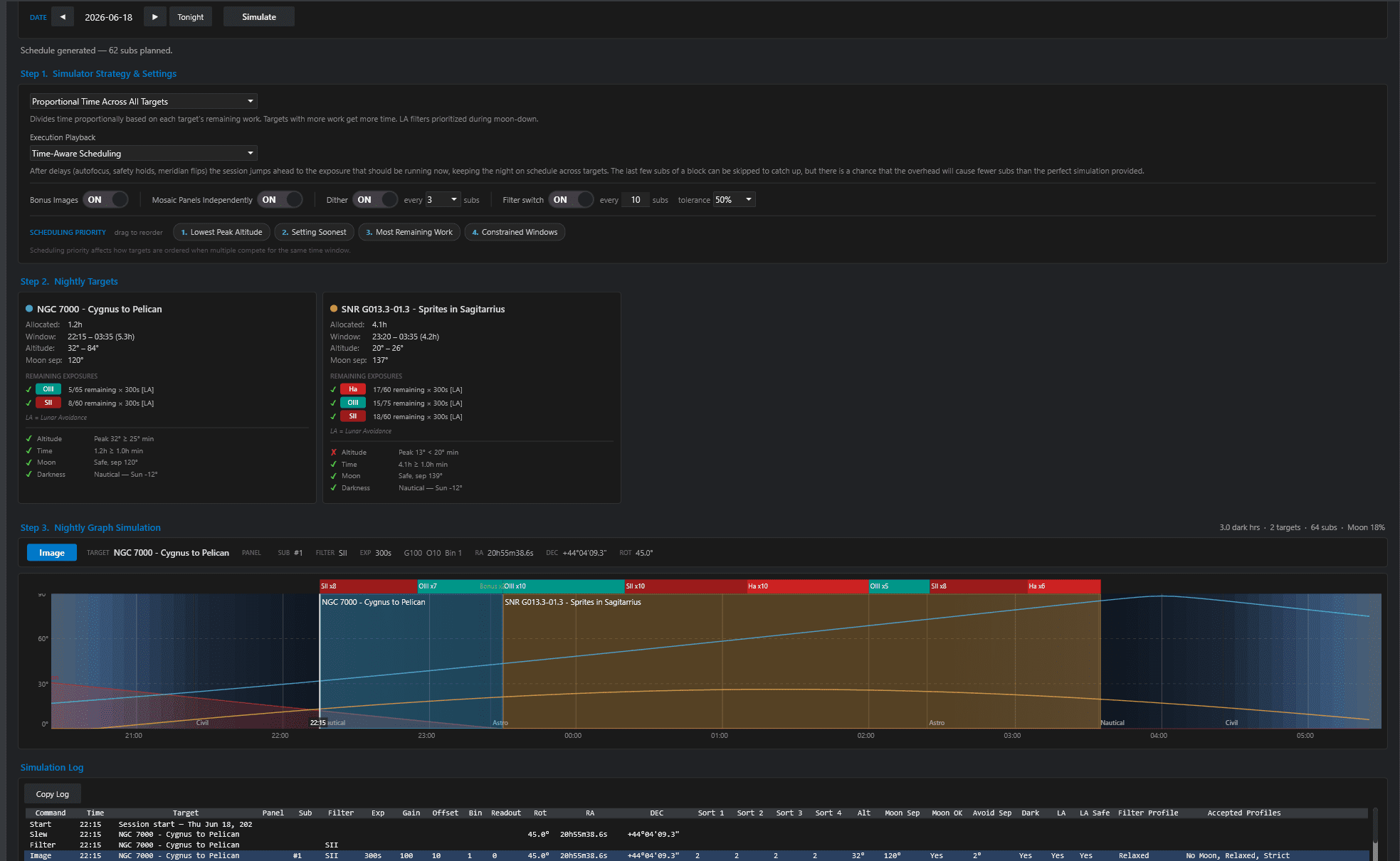
Preview your entire imaging night before the sun goes down. The Simulator builds an optimized schedule from your cloud targets using your location, telescope, and camera settings.
It factors in altitude constraints, moon separation and avoidance, remaining exposures, and darkness windows — then generates a timeline showing exactly which targets and filters will run, and when.
Adjust scheduling priorities by dragging to reorder: lowest peak altitude, setting soonest, most remaining work, or constrained windows. Toggle dither intervals, filter switching cadence, and bonus imaging — then simulate to see the plan update in real time.
A duplicate of our Astro PM Simulator lets you preview your exact evening schedule right from inside the NINA plugin.
Each target will load their own card with evening filters and all the statistics to show when is Go/No Go zones during the evening. No guessing what the schedule will decide.
Choose multiple playbacks from time-aware to stay on schedule OR sequential to have it capture line by line order. Each simulation log shows hard data and lunar avoidance calculations.
Update your active targets in the app, and they automatically go to the cloud and to your NINA when you simulate. Even go offline/vacation mode and have NINA handle multiple nights.
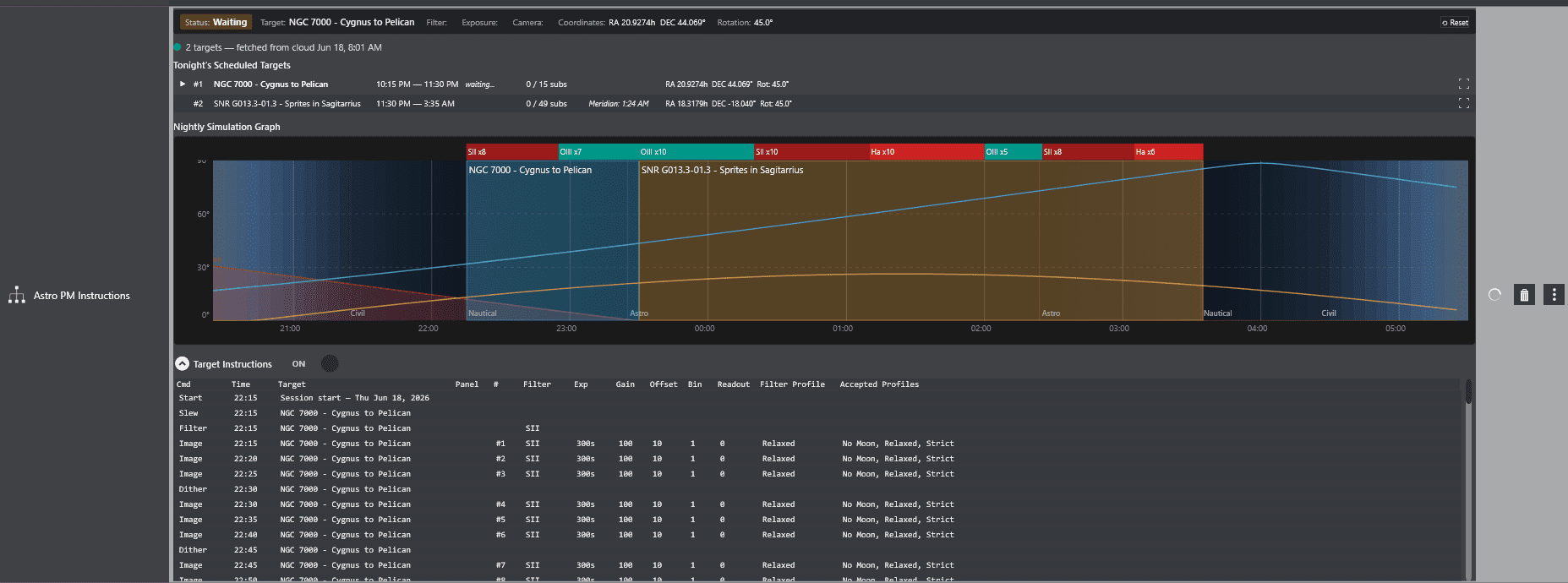
Drop the Astro PM Instructions block into N.I.N.A.’s Advanced Sequencer and your simulated schedule becomes a live imaging plan. The instruction set takes over your night — slewing to each target, switching filters, and capturing exposures exactly as the simulator planned.
A built-in nightly graph shows your full schedule at a glance with color-coded filter blocks across the altitude timeline. Track progress as each target completes its allocated subs, with real-time status updates for the current target, filter, and coordinates.
One sequence instruction does it all. Slew, Center, Rotate, Image, Dither all from one instruction set.
Two modes let you play Sequentially line by line OR you can do Time Sensitive where the scheduler will try to keep up and on schedule. Overhead such as slewing, autofocus, platesolves, and personal imaging preferences vary here, so scheduler has two modes for you to choose.
The Astro PM simulation engine is powerful, and will execute your exact simulations that you establish.
Just drop into an instruction set, and setup regular triggers such as meridian flips, center after drifts, autofocus triggers, and the scheduler will honor them. Makes it easy to customize as you see fit.
Four custom sequence modules that plug directly into N.I.N.A.’s Advanced Sequencer, giving you full control over how Astro PM drives your imaging sessions.
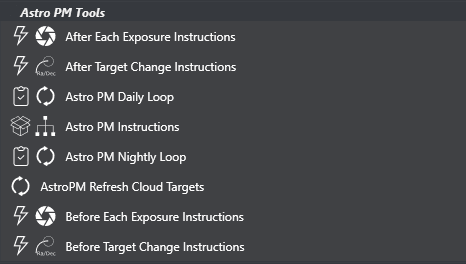
A container that runs once per day. Place your nightly imaging instructions inside — the loop handles the daily reset so your sequence can run unattended across multiple nights.
Runs continuously throughout the night, cycling through your scheduled targets. Handles target transitions, filter changes, and exposure sequencing until dawn or completion.
Special triggers can be added for before or after target changes. Just drop in any instructions such as pushover notifications and they will happen before or after a slew to new target occurs.
The core instruction block. Loads your simulated schedule into the Advanced Sequencer — targets, filters, exposures, and timing — ready to execute as a complete imaging plan.
Pulls the latest target data from your Astro PM cloud account. Add or update projects during the day and your changes are available in N.I.N.A. with a single refresh.
Special triggers can be added for before or after each exposure. Great for any specific instructions you need to occur prior to or after any exposure. Just drag instructions into the trigger and let it happen.
Free Downloads
Don’t want to build a sequence from scratch? Download a fully-annotated starter, then in N.I.N.A.’s Advanced Sequencer click Import and select the file. Each one already wires up the Astro PM instruction set — just assign your equipment profile and run.
The simplest way to start. No dome or safety monitor required — unpark, image tonight’s plan, and park. Perfect for portable rigs and your first run.
Requires: Astro PM plugin
For observatories with a safety monitor. Opens the dome only while safe, secures and waits when unsafe, images tonight’s plan, then parks and closes.
Requires: Astro PM plugin · Safety Monitor
Fully hands-off across many nights. Waits for sunset, images until done, secures by day, and repeats until every project is complete.
Requires: Astro PM plugin · Safety Monitor · Sequencer Powerups (Sequencer+)
We have offline/vacation mode! Just enable offline mode and our plugin will continue to collect images and exposures collectively each night.
Just sync targets before you go, and when when you come back, sync your images and your project is up to date!
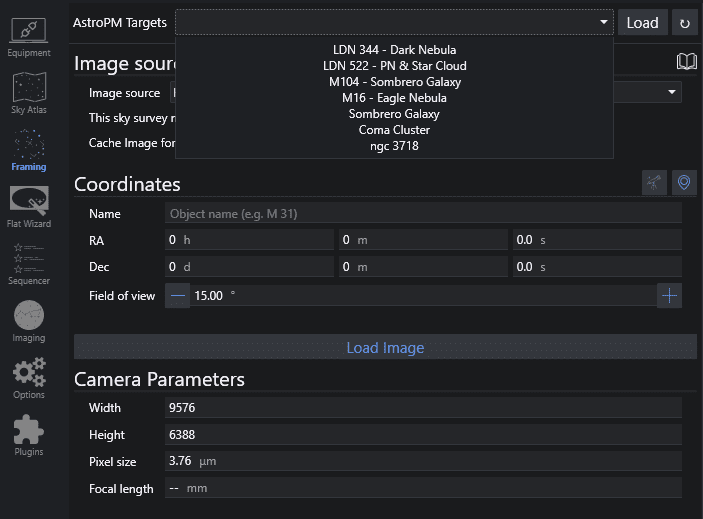
Need to frame each target? We have that covered.
Targets also land in N.I.N.A.’s Framing Wizard with coordinates, rotation, and mosaic panels already populated — ready to slew, plate-solve, and start capturing.
Just locate the top pull-down, refresh your cloud targets, and then load it into the Framing Wizard. Ready to use in an advanced sequence or target scheduler.