
Skip to content
  • Home
  • Astro PM Features
    • Equipment Management
    • Project Management
    • N.I.N.A. Automation
    • Sky View & Framing
    • Weather Forecast
    • SubInspector
    • Image Analysis
    • Calculators & Tools
  • Buy License
  • Resources
    • Documentation
    • View YouTube Channel
    • Join Discord Channel
    • Join Facebook Page
    • Contact Us
    • Account
  • Home
  • Astro PM Features
    • Equipment Management
    • Project Management
    • N.I.N.A. Automation
    • Sky View & Framing
    • Weather Forecast
    • SubInspector
    • Image Analysis
    • Calculators & Tools
  • Buy License
  • Resources
    • Documentation
    • View YouTube Channel
    • Join Discord Channel
    • Join Facebook Page
    • Contact Us
    • Account
Buy License
Download
Sign up for our Newsletter:

Installation & Setup

6
  • System Requirements & Download
  • Installing Astro PM on Windows
  • Activating Your License
  • First Launch Setup
  • Updating Astro PM
  • Cloud Sync & Your Sync Token

Astro PM App Guide

34
  • App Overview & Navigation
  • Astro PM Settings
  • Equipment Setup
    • Imaging Systems
    • Observing Sites
    • Telescopes
    • Cameras
    • Filters & Exposure Plans
    • Eyepieces
    • Sharing Equipment
  • Framing
    • Sky View & Framing
    • Surveys & Star Rendering
    • Overlays & Catalogs
    • Time Controls & Timeline
    • Exoplanet Targets & Transit Planning
  • Projects
    • Project Management
    • Creating Projects & Targets
    • Exposure Plans & Progress Tracking
    • Target Visibility & Charts
    • Moon Avoidance
    • Mosaic Planning
  • Community
    • Astro PM Gallery
    • Image of the Week
    • My Gallery Images
  • Weather
    • Weather Forecasting
  • NINA Tools
    • The Nightly Simulator
    • Scheduling Strategies
    • Managing Cloud Targets
  • Analysis Tools & Calculators
    • Image Analysis Tools Overview
    • SubInspector
    • Single Image Analysis Tools
    • Image Annotator
    • Sampling Calculator
    • Exposure Calculator
    • Focal Length Calculator

Astro PM NINA Guide

10
  • Installing the NINA Plugin
  • Connecting NINA to Astro PM
  • Astro PM Instructions Explained
  • Building Your Sequence
  • Offline & Vacation Mode
  • Playback Modes
  • The NINA Simulator Panel
  • Automated Flat Handling
  • Trigger Sets: Custom Instructions
  • NINA Troubleshooting

Astro PM Phone Guide

7
  • Installing the Phone App
  • Pairing Your Phone
  • Browsing Systems & Targets
  • Live Session Monitoring
  • The Weather Panel
  • Remote Pause & Resume
  • Phone App Troubleshooting
View Categories
  • Home
  • Docs
  • Astro PM App Guide
  • Analysis Tools & Calculators
  • Sampling Calculator

Sampling Calculator

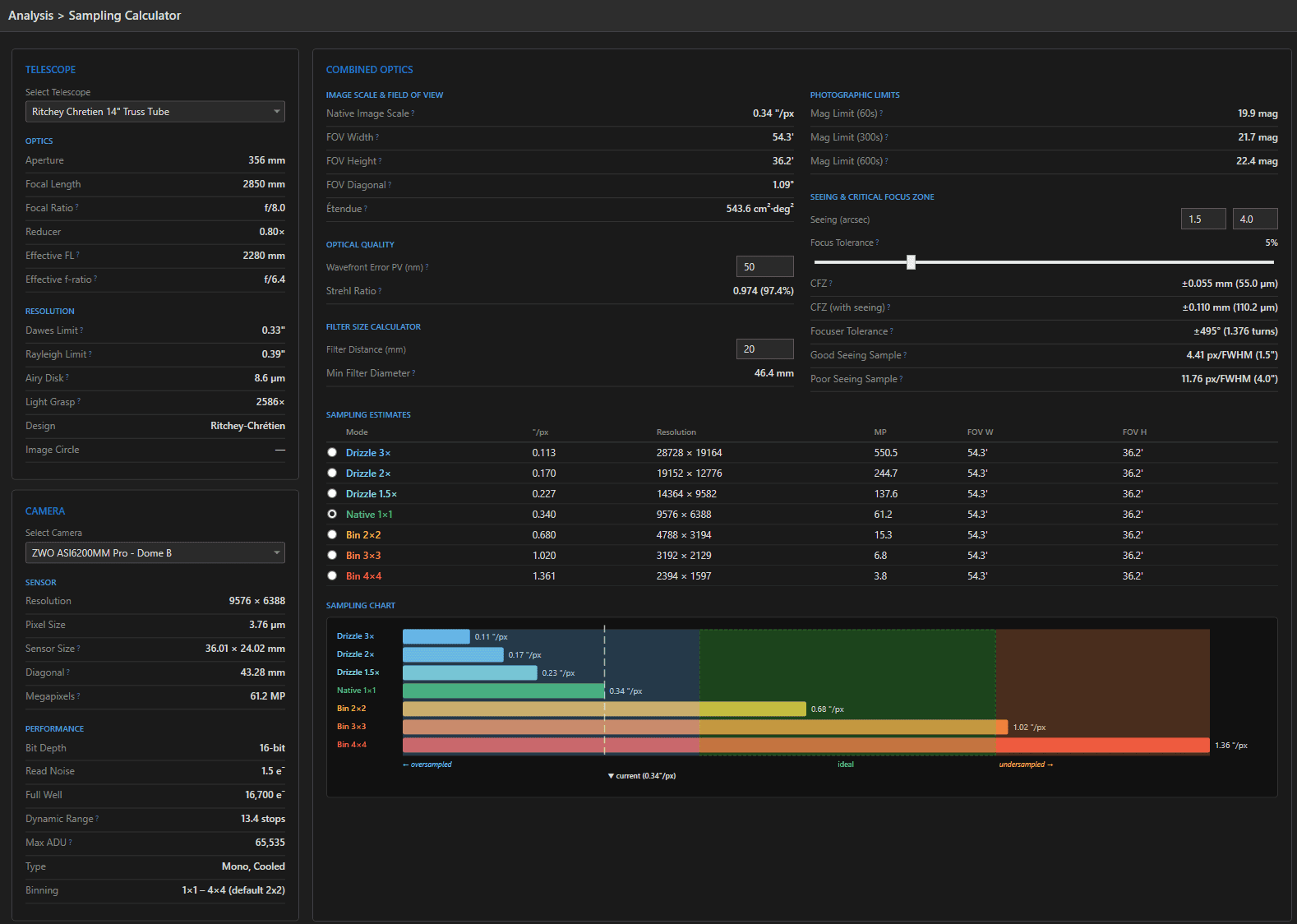
The Sampling Calculator is the spec sheet your equipment combination never came with: pick a telescope and camera and every optical and sensor figure of merit is derived live – no data entry, no formulas to remember.

Telescope Figures #

FigureHow it is computedWhat it tells you
Focal ratio / effective FLFL / aperture; FL × reducerspeed and true focal length with your reducer
Dawes limit116 / aperture (mm)closest double star you can split (arcsec)
Rayleigh limit138 / aperture (mm)formal diffraction limit at 550nm
Airy disk2.44 × λ × f-ratiodiffraction spot size in microns – compare to your pixel size
Light grasp(aperture / 7)²light gathering vs. the dark-adapted eye

Camera Figures #

Sensor dimensions, diagonal, and megapixels from resolution × pixel size, plus the performance numbers that matter for imaging: read noise, full well, dynamic range in stops (log₂ of full well / read noise), and max ADU from bit depth. Binning capabilities are listed as configured in your Equipment library.
The Combined System #

  • Image scale – 206.265 × pixel size / focal length, in arcsec/px: the single most consequential number of the pairing.
  • Field of view – width, height, and diagonal, in arcminutes and degrees.
  • Étendue (AΩ) – collecting area × sky solid angle: the survey-power metric that lets you compare a fast widefield against a big slow SCT on one axis.

Sampling vs. Your Seeing #
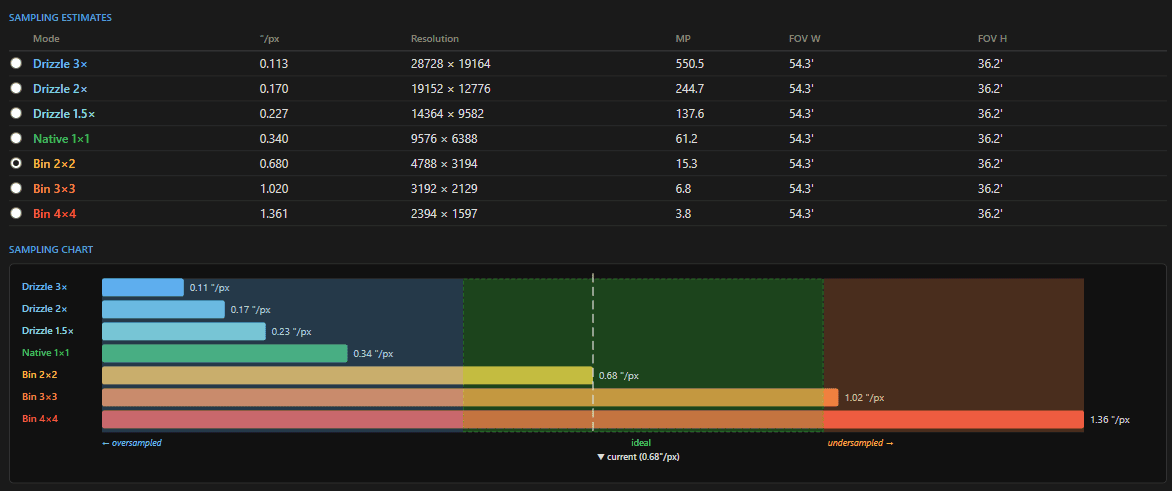
The sampling section divides seeing FWHM by image scale to get pixels per FWHM, evaluated at both your best and worst typical seeing. The target zone is the Nyquist-ish 2-3 px/FWHM: below ~2 you are undersampled (blocky stars, lost resolution), well above 3 you are oversampled (spreading photons thin for no detail gain – though binning can fix that downstream). Because it shows both seeing extremes, you can judge whether a combination works across your real conditions, not just on the best night of the year.

Optical Quality: Strehl From Wavefront Error #

Enter your optics’ wavefront error (P-V, nm – e.g. λ/4 at 550nm is ~137nm) and the calculator applies the Maréchal approximation to estimate Strehl ratio. Above 0.8 is the classic “diffraction-limited” bar. Useful for translating a test report into an intuition for what the glass actually delivers.

Tip: Evaluating a purchase? Create the telescope or camera in the Equipment library first (takes a minute), then pair it here with your existing gear – image scale, FOV, and sampling against your seeing tell you more than any review.
Updated on July 12, 2026
Image AnnotatorExposure Calculator
Page Content
  • Telescope Figures
  • Camera Figures
  • The Combined System
  • Sampling vs. Your Seeing
  • Optical Quality: Strehl From Wavefront Error

Features

  • Equipment Library
  • Project Management
  • Sky View & Framing
  • Image Analysis
  • Calculators
  • SubInspector
  • NINA Plugin

Resources

  • Contact Us
  • Terms of Service
  • View Account
  • Discord Channel
  • Join Facebook

Get Started

Professional astrophotography project management software. Plan imaging sessions, manage equipment, analyze sub-frames, and sync targets to NINA — all in one workspace.

Download

© 2026 AstroPM

Terms of Use & Privacy Policy