
The camera entry is the most detailed in the library, because it feeds the most physics: FOV and sampling come from its geometry, exposure recommendations from its noise model, and NINA captures with its defaults. Get this one right and the Exposure Calculator becomes genuinely predictive.
Sensor Geometry & Basics #
| Field | Notes |
|---|---|
| Name / Brand / Model / Sensor Name | sensor part number (e.g. IMX533) helps library matching |
| Sensor Width × Height (px) | with pixel size, defines FOV and sensor dimensions |
| Pixel Size (µm) | the key to image scale: 206.265 × pixel size / focal length |
| Bit Depth | 8 / 12 / 14 / 16 – sets max ADU (2^bits) |
| Cooled / Color (OSC) | cooling flag and one-shot-color flag |
The Default Gain Mode #
This block is the camera’s standard operating point – and it follows the camera between sites and rigs:
- Gain / Offset / Binning – the driver settings pre-filled into new exposure plan lines when this camera is on a project.
- Gain (e-/ADU), Read Noise (e-), Full Well (e-) – the noise model at that gain setting. These three travel together: change the gain on your camera and all three change with it.
Two sensor properties sit apart because they do not vary with gain: Quantum Efficiency (default 0.80) and Dark Current at 20°C (default 0.005 e-/px/s, scaled to your actual sensor temperature with the 6°C-doubling rule in the exposure model).

Gain Modes & Readout Modes #
Gain Modes (optional list): capture additional operating points from your camera’s datasheet – a low-gain/unity mode for best dynamic range, a high-gain mode for lowest read noise, an HCG mode if the sensor has one. Each mode carries its own read noise, full well, and e-/ADU, and becomes selectable in the Exposure Calculator for direct comparison.
Readout Modes (optional list): the named modes your driver exposes (“High Gain”, “Low Gain”, “HDR” – native ZWO ASI cameras expose only “Default”). Spell each name exactly as the driver reports it – the NINA plugin matches these names against the live camera at capture time. The default mode pre-fills new exposure-plan lines.
Computed Stats & Comparisons #
The stats panel derives sensor size in millimeters, diagonal, megapixels, aspect ratio, dynamic range in stops (log₂ of full well / read noise), max ADU, and per-binning figures. Two comparison aids round it out: a sensor-size overlay drawing your cameras’ outlines at true relative scale, and a sortable comparison table of every camera in the library – the fastest way to reason about an upgrade.
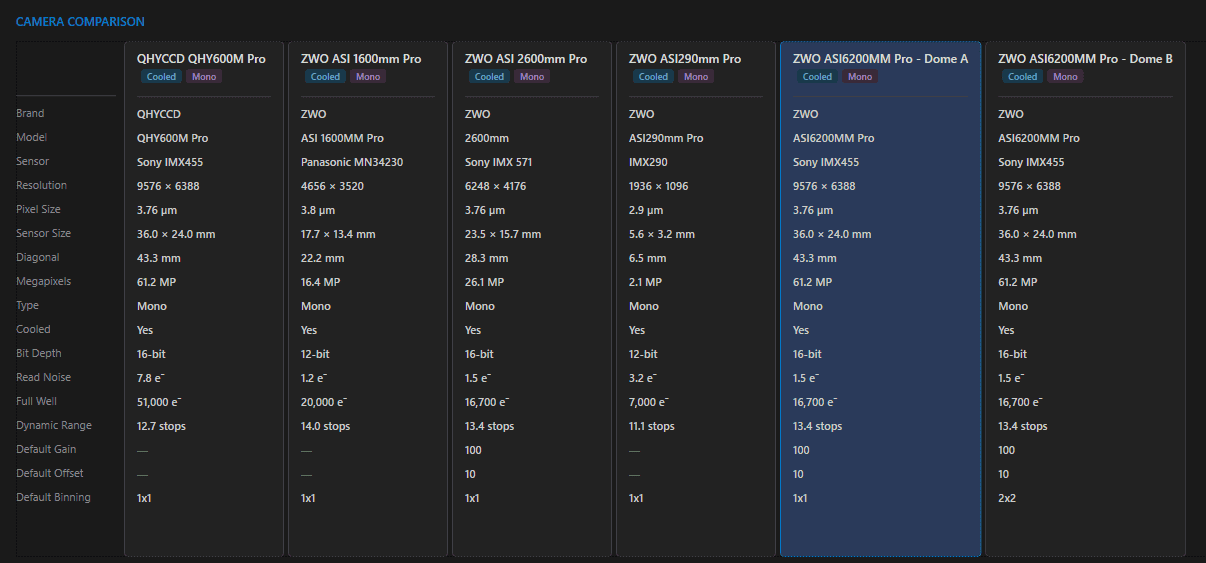
Calibration Frame Library #
Every camera can point at the folder holding its dark and bias library. Click Browse on the Calibration Frame Library card and Astro PM scans the folder recursively – reading only FITS/XISF headers (compressed .fz included), never pixel data, so even a multi-gigabyte library scans in seconds and files are never touched.
Frames are classified by their IMAGETYP header first, then folder names, then filename tokens, and grouped into one row per capture signature – type, binning, exposure, gain, temperature, and dimensions – with frame count, master status, and the age of the newest frame. Every column header sorts.
- Master detection – stacking headers (STACKCNT, NCOMBINE, NIMAGES), PixInsight integration history, Astro Pixel Processor conventions, or a “master” filename token; the Master column shows the integrated sub count.
- Age tint – groups older than six months tint amber as a refresh reminder.
- Dimension check – a frame size that doesn’t match the camera’s sensor at that binning tints amber with an explanatory tooltip.
- Smart caching – results cache per file on this machine, so revisiting a camera is instant and a rescan reads only new or changed files. Cloud “online-only” placeholders are skipped, never downloaded.
Cameras with a scanned library show Darks and Bias badges on their comparison cards, and the library powers the per-project coverage check on the Calibration Frames tab. Flats are session-specific and tracked per project there.

Where Camera Data Is Used #
- Geometry (pixels × pixel size) – FOV and image scale in Sky View, mosaics, thumbnails, and the Sampling Calculator.
- Noise model (read noise, full well, QE, dark current, gain modes) – the entire Exposure Calculator, both modes.
- Defaults (gain/offset/binning/readout) – pre-fill every new exposure plan line; NINA captures with exactly these values, and readout-mode names resolve on the live camera.
- Calibration library – the camera’s dark/bias library backs the coverage checks on every project’s Calibration Frames tab and the project-card badges.
A camera is one third of every Imaging System; edits propagate to all projects on rigs using it, and deletion is blocked while referenced.