
Skip to content
  • Home
  • Astro PM Features
    • Equipment Management
    • Project Management
    • N.I.N.A. Automation
    • Sky View & Framing
    • Weather Forecast
    • SubInspector
    • Image Analysis
    • Calculators & Tools
  • Buy License
  • Resources
    • Documentation
    • View YouTube Channel
    • Join Discord Channel
    • Join Facebook Page
    • Contact Us
    • Account
  • Home
  • Astro PM Features
    • Equipment Management
    • Project Management
    • N.I.N.A. Automation
    • Sky View & Framing
    • Weather Forecast
    • SubInspector
    • Image Analysis
    • Calculators & Tools
  • Buy License
  • Resources
    • Documentation
    • View YouTube Channel
    • Join Discord Channel
    • Join Facebook Page
    • Contact Us
    • Account
Buy License
Download
Sign up for our Newsletter:

Installation & Setup

6
  • System Requirements & Download
  • Installing Astro PM on Windows
  • Activating Your License
  • First Launch Setup
  • Updating Astro PM
  • Cloud Sync & Your Sync Token

Astro PM App Guide

34
  • App Overview & Navigation
  • Astro PM Settings
  • Equipment Setup
    • Imaging Systems
    • Observing Sites
    • Telescopes
    • Cameras
    • Filters & Exposure Plans
    • Eyepieces
    • Sharing Equipment
  • Framing
    • Sky View & Framing
    • Surveys & Star Rendering
    • Overlays & Catalogs
    • Time Controls & Timeline
    • Exoplanet Targets & Transit Planning
  • Projects
    • Project Management
    • Creating Projects & Targets
    • Exposure Plans & Progress Tracking
    • Target Visibility & Charts
    • Moon Avoidance
    • Mosaic Planning
  • Community
    • Astro PM Gallery
    • Image of the Week
    • My Gallery Images
  • Weather
    • Weather Forecasting
  • NINA Tools
    • The Nightly Simulator
    • Scheduling Strategies
    • Managing Cloud Targets
  • Analysis Tools & Calculators
    • Image Analysis Tools Overview
    • SubInspector
    • Single Image Analysis Tools
    • Image Annotator
    • Sampling Calculator
    • Exposure Calculator
    • Focal Length Calculator

Astro PM NINA Guide

10
  • Installing the NINA Plugin
  • Connecting NINA to Astro PM
  • Astro PM Instructions Explained
  • Building Your Sequence
  • Offline & Vacation Mode
  • Playback Modes
  • The NINA Simulator Panel
  • Automated Flat Handling
  • Trigger Sets: Custom Instructions
  • NINA Troubleshooting

Astro PM Phone Guide

7
  • Installing the Phone App
  • Pairing Your Phone
  • Browsing Systems & Targets
  • Live Session Monitoring
  • The Weather Panel
  • Remote Pause & Resume
  • Phone App Troubleshooting
View Categories
  • Home
  • Docs
  • Astro PM App Guide
  • Analysis Tools & Calculators
  • Focal Length Calculator

Focal Length Calculator

Your telescope’s real focal length is rarely the number on the box – and on mirror-spacing designs (RC, SCT, Cassegrain) it drifts with collimation and focus position. This calculator measures the truth with a plate solve and, for adjustable designs, tells you which mirror to move, which direction, and how far.

Step 1: Manufacturer Optics #

Select the telescope and the spec-sheet numbers populate: native and reduced focal length, focal ratios, Dawes and Rayleigh limits. These are the targets the measurement will be compared against. Backfocus and focuser travel fields round out the mechanical picture.

Step 2: Measure With a Plate Solve #

Open any recent sub (FITS, XISF, TIFF – XISF is converted automatically) and the calculator runs ASTAP on it. The solved plate scale plus the pixel size from the image header yield the measured effective focal length:

EFL = 206.265 × pixel size (µm) / plate scale (arcsec/px)

This is ground truth – the focal length your optical train actually delivered on that frame, including reducer, spacing, and temperature effects.
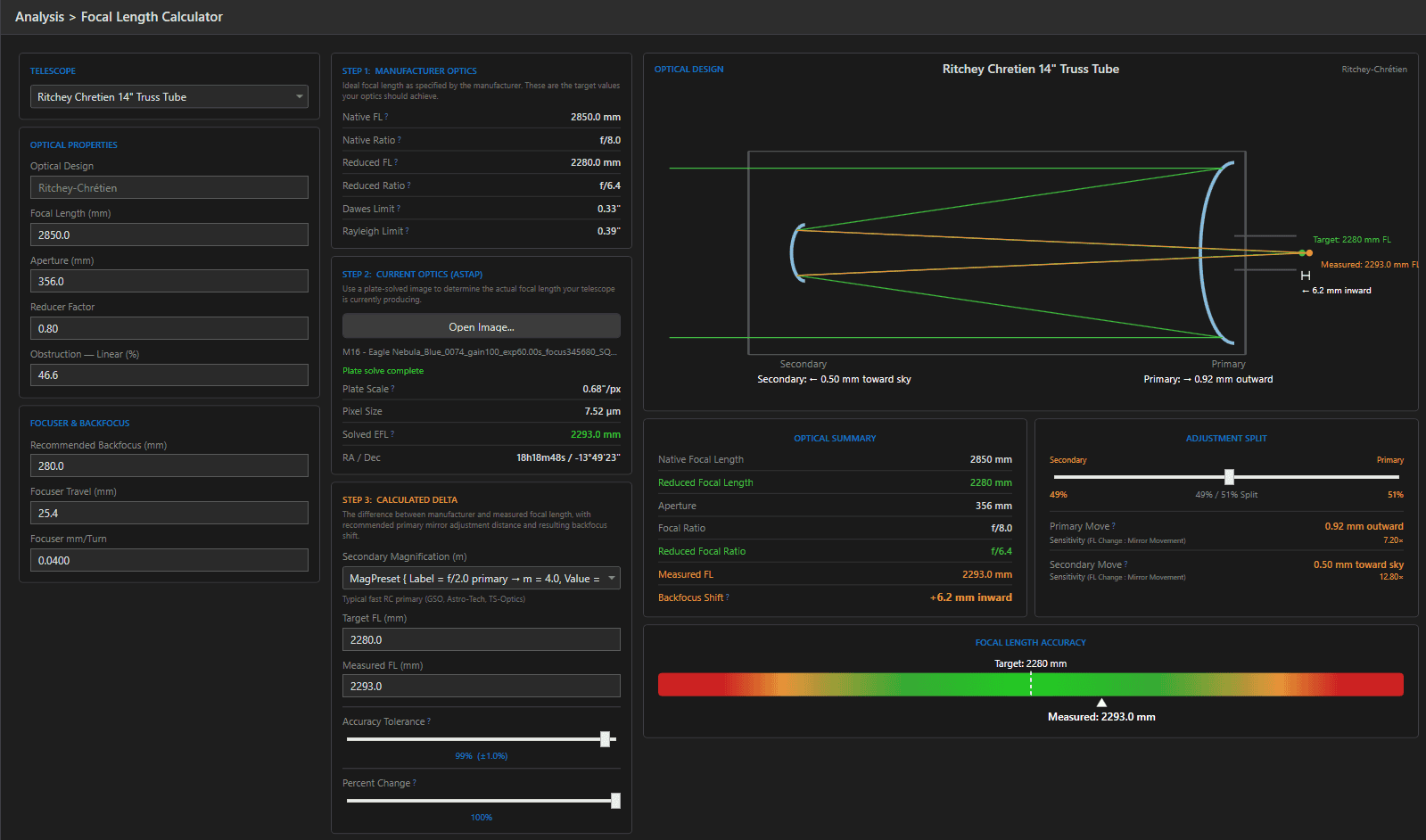
14" RC with platesolved image. Shows direction to move mirrors.

Step 3: The Delta & Mirror Adjustment #

For adjustable designs the calculator turns the target-vs-measured difference into mechanical guidance. The key concept is secondary magnification (m) – how much the secondary mirror amplifies the primary’s focal length. Presets cover the common designs (e.g. an f/8 GSO-style RC uses an f/2 primary, m = 4; an EdgeHD runs m ≈ 5.26), or enter your own.

Why m matters: mirror-spacing changes are amplified by m² at the secondary – on an m = 4 RC, moving the secondary 0.1mm changes focal length roughly 16× more than the same move of the primary. The calculator computes both options with their sensitivities, and an adjustment split slider lets you distribute the correction between mirrors. Direction is spelled out in plain words (“0.05 mm toward sky”), along with the focuser backfocus shift that compensates.
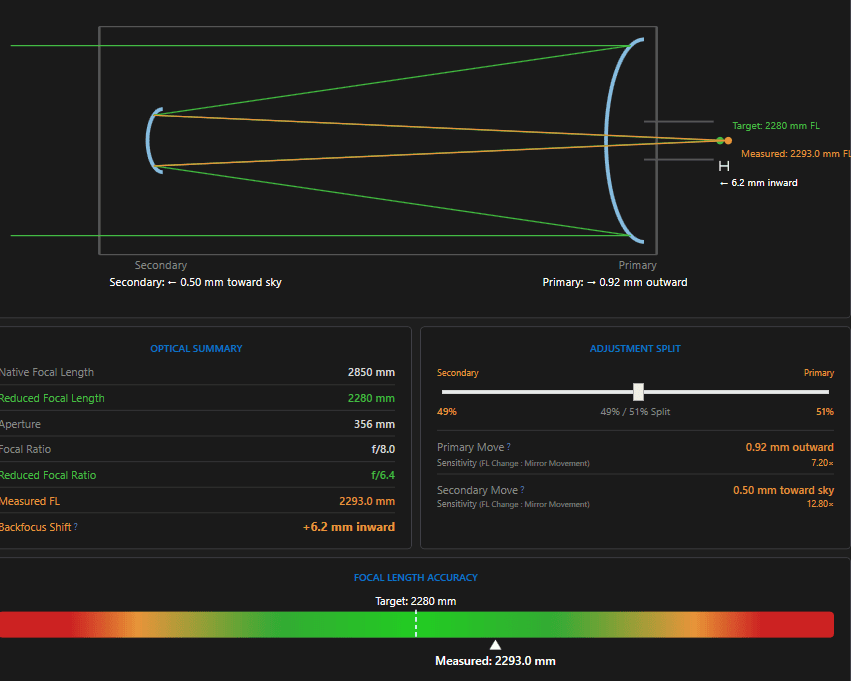
Use slider to choose secondary or primary or both to adjust

The Accuracy Bar & Tolerance #

A gradient bar visualizes where the measured focal length sits: green zone = within your chosen tolerance (default 98%, i.e. ±2%), amber and red beyond. The Percent Change slider scales the recommended correction if you deliberately want a partial move – useful when chasing a target in small, safe steps.

Tip: Iterate: adjust, refocus, shoot one frame, re-solve. Two or three rounds typically walks an RC to within a few millimeters of spec. Never move the secondary more than a fraction of a turn at a time – m² is not your friend in reverse.

The Optical Diagram #

The right-hand panel draws your telescope’s optical layout – primary, secondary, and focal plane – annotated with the ideal and measured light paths, plus a live summary of every figure: native and reduced focal length and ratio, measured EFL, backfocus shift, and the per-mirror moves with their sensitivities. A screenshot of this panel is the perfect note to keep with your maintenance log.

Updated on July 12, 2026
Exposure CalculatorImage Analysis Tools Overview
Page Content
  • Step 1: Manufacturer Optics
  • Step 2: Measure With a Plate Solve
  • Step 3: The Delta & Mirror Adjustment
  • The Accuracy Bar & Tolerance
  • The Optical Diagram

Features

  • Equipment Library
  • Project Management
  • Sky View & Framing
  • Image Analysis
  • Calculators
  • SubInspector
  • NINA Plugin

Resources

  • Contact Us
  • Terms of Service
  • View Account
  • Discord Channel
  • Join Facebook

Get Started

Professional astrophotography project management software. Plan imaging sessions, manage equipment, analyze sub-frames, and sync targets to NINA — all in one workspace.

Download

© 2026 AstroPM

Terms of Use & Privacy Policy