Skip to content
  • Home
  • Astro PM Features
    • Equipment Management
    • Project Management
    • N.I.N.A. Automation
    • Sky View & Framing
    • Weather Forecast
    • SubInspector
    • Image Analysis
    • Calculators & Tools
  • Buy License
  • Resources
    • Documentation
    • View YouTube Channel
    • Join Discord Channel
    • Join Facebook Page
    • Contact Us
    • Account
  • Home
  • Astro PM Features
    • Equipment Management
    • Project Management
    • N.I.N.A. Automation
    • Sky View & Framing
    • Weather Forecast
    • SubInspector
    • Image Analysis
    • Calculators & Tools
  • Buy License
  • Resources
    • Documentation
    • View YouTube Channel
    • Join Discord Channel
    • Join Facebook Page
    • Contact Us
    • Account
Buy License
Download
Sign up for our Newsletter:

Installation & Setup

6
  • System Requirements & Download
  • Installing Astro PM on Windows
  • Activating Your License
  • First Launch Setup
  • Updating Astro PM
  • Cloud Sync & Your Sync Token

Astro PM App Guide

34
  • App Overview & Navigation
  • Astro PM Settings
  • Equipment Setup
    • Imaging Systems
    • Observing Sites
    • Telescopes
    • Cameras
    • Filters & Exposure Plans
    • Eyepieces
    • Sharing Equipment
  • Framing
    • Sky View & Framing
    • Surveys & Star Rendering
    • Overlays & Catalogs
    • Time Controls & Timeline
    • Exoplanet Targets & Transit Planning
  • Projects
    • Project Management
    • Creating Projects & Targets
    • Exposure Plans & Progress Tracking
    • Target Visibility & Charts
    • Moon Avoidance
    • Mosaic Planning
  • Community
    • Astro PM Gallery
    • Image of the Week
    • My Gallery Images
  • Weather
    • Weather Forecasting
  • NINA Tools
    • The Nightly Simulator
    • Scheduling Strategies
    • Managing Cloud Targets
  • Analysis Tools & Calculators
    • Image Analysis Tools Overview
    • SubInspector
    • Single Image Analysis Tools
    • Image Annotator
    • Sampling Calculator
    • Exposure Calculator
    • Focal Length Calculator

Astro PM NINA Guide

10
  • Installing the NINA Plugin
  • Connecting NINA to Astro PM
  • Astro PM Instructions Explained
  • Building Your Sequence
  • Offline & Vacation Mode
  • Playback Modes
  • The NINA Simulator Panel
  • Automated Flat Handling
  • Trigger Sets: Custom Instructions
  • NINA Troubleshooting

Astro PM Phone Guide

7
  • Installing the Phone App
  • Pairing Your Phone
  • Browsing Systems & Targets
  • Live Session Monitoring
  • The Weather Panel
  • Remote Pause & Resume
  • Phone App Troubleshooting
View Categories
  • Home
  • Docs
  • Astro PM App Guide
  • Equipment Setup
  • Eyepieces

Eyepieces

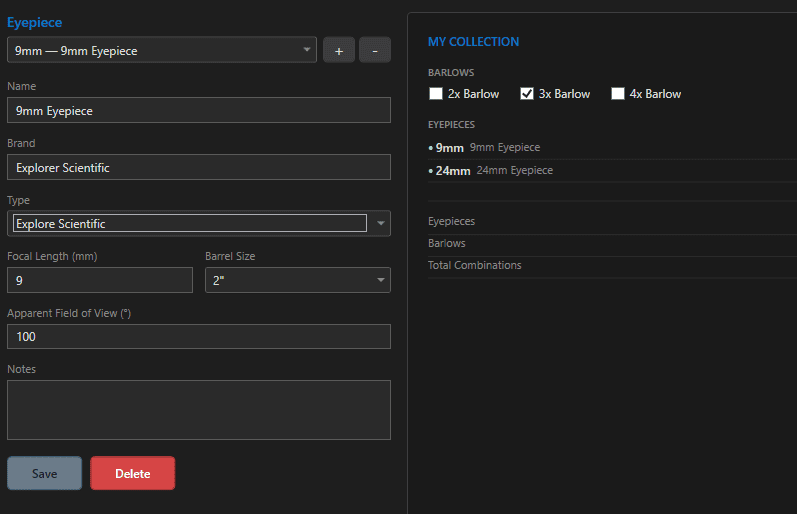
Not every night is an imaging night. The Eyepieces section is Astro PM’s nod to visual observing: catalog your eyepieces and barlows once, and the app answers the eternal eyepiece-case question – which one for this target? – with real numbers for every scope you own.

The Fields #

FieldNotes
Name / Brande.g. “Nagler 31mm”, Tele Vue
TypePlössl, Super Plössl, Kellner, Orthoscopic, Nagler, Ethos, Delos, XW, Morpheus, Explore Scientific – organizational
Focal Length (mm)the magnification driver: scope FL / eyepiece FL
Apparent FOV (°)30-82° typical; wider = more immersive
Barrel Size1.25″, 2″, 3″

Barlows live in the same collection with a barlow factor instead of a focal length – the quick checkboxes (2×, 3×, 4×) add or remove them from your inventory in one click.

What the Collection Computes #

For every eyepiece (and every eyepiece × barlow combination) against your telescopes:

FigureFormulaWhy it matters
Magnificationscope FL / eyepiece FL (× barlow)the basic power of the combination
True field of viewapparent FOV / magnificationhow much sky you actually see – will the Pleiades fit?
Exit pupilaperture / magnificationmatch to your eye: ~1-7mm useful range

The Magnification Coverage Chart #

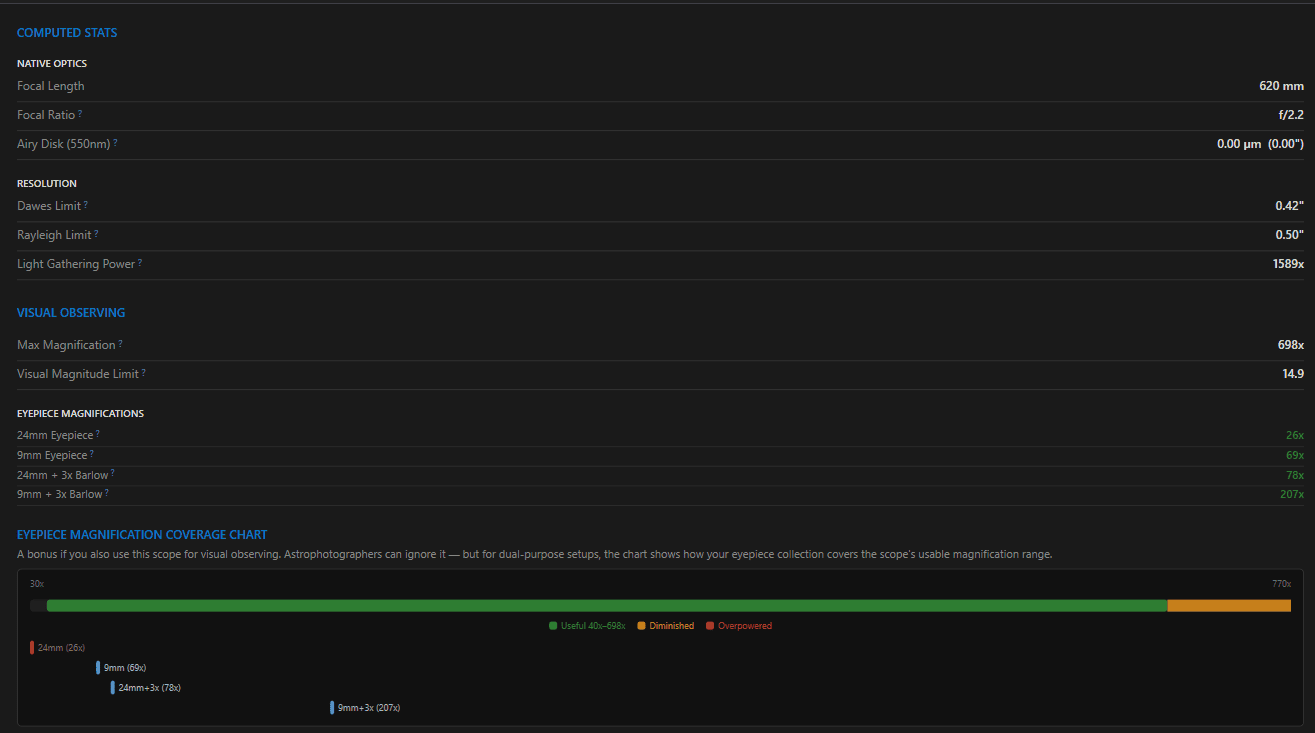
The chart plots every combination you own across the magnification range, with shaded guidance for sensible power per your aperture. Gaps jump out instantly – the classic discovery being a case full of eyepieces that all land between 80× and 120×, and nothing for wide-field sweeping or planetary nights. Consult it before buying the next eyepiece, not after.

Scope of This Section #

Eyepieces are deliberately standalone: they are not part of Imaging Systems, are not consumed by the scheduler or exposure calculators, and do not sync to NINA or the phone – they are a visual-observing planning tool, kept alongside the rest of your gear so the whole observatory lives in one inventory.

If you visit your telescope section, it will give you a spectrum of where your eyepieces land with that optical telescope system visually.  The graph is a good way to tell if you have basic coverage across eyepieces and the equipment.
Updated on July 12, 2026
Filters & Exposure PlansSharing Equipment
Page Content
  • The Fields
  • What the Collection Computes
  • The Magnification Coverage Chart
  • Scope of This Section

Features

  • Equipment Library
  • Project Management
  • Sky View & Framing
  • Image Analysis
  • Calculators
  • SubInspector
  • NINA Plugin

Resources

  • Contact Us
  • Terms of Service
  • View Account
  • Discord Channel
  • Join Facebook

Get Started

Professional astrophotography project management software. Plan imaging sessions, manage equipment, analyze sub-frames, and sync targets to NINA — all in one workspace.

Download

© 2026 AstroPM

Terms of Use & Privacy Policy