
Skip to content
  • Home
  • Astro PM Features
    • Equipment Management
    • Project Management
    • N.I.N.A. Automation
    • Sky View & Framing
    • Weather Forecast
    • SubInspector
    • Image Analysis
    • Calculators & Tools
  • Buy License
  • Resources
    • Documentation
    • View YouTube Channel
    • Join Discord Channel
    • Join Facebook Page
    • Contact Us
    • Account
  • Home
  • Astro PM Features
    • Equipment Management
    • Project Management
    • N.I.N.A. Automation
    • Sky View & Framing
    • Weather Forecast
    • SubInspector
    • Image Analysis
    • Calculators & Tools
  • Buy License
  • Resources
    • Documentation
    • View YouTube Channel
    • Join Discord Channel
    • Join Facebook Page
    • Contact Us
    • Account
Buy License
Download
Sign up for our Newsletter:

Installation & Setup

6
  • System Requirements & Download
  • Installing Astro PM on Windows
  • Activating Your License
  • First Launch Setup
  • Updating Astro PM
  • Cloud Sync & Your Sync Token

Astro PM App Guide

34
  • App Overview & Navigation
  • Astro PM Settings
  • Equipment Setup
    • Imaging Systems
    • Observing Sites
    • Telescopes
    • Cameras
    • Filters & Exposure Plans
    • Eyepieces
    • Sharing Equipment
  • Framing
    • Sky View & Framing
    • Surveys & Star Rendering
    • Overlays & Catalogs
    • Time Controls & Timeline
    • Exoplanet Targets & Transit Planning
  • Projects
    • Project Management
    • Creating Projects & Targets
    • Exposure Plans & Progress Tracking
    • Target Visibility & Charts
    • Moon Avoidance
    • Mosaic Planning
  • Community
    • Astro PM Gallery
    • Image of the Week
    • My Gallery Images
  • Weather
    • Weather Forecasting
  • NINA Tools
    • The Nightly Simulator
    • Scheduling Strategies
    • Managing Cloud Targets
  • Analysis Tools & Calculators
    • Image Analysis Tools Overview
    • SubInspector
    • Single Image Analysis Tools
    • Image Annotator
    • Sampling Calculator
    • Exposure Calculator
    • Focal Length Calculator

Astro PM NINA Guide

10
  • Installing the NINA Plugin
  • Connecting NINA to Astro PM
  • Astro PM Instructions Explained
  • Building Your Sequence
  • Offline & Vacation Mode
  • Playback Modes
  • The NINA Simulator Panel
  • Automated Flat Handling
  • Trigger Sets: Custom Instructions
  • NINA Troubleshooting

Astro PM Phone Guide

7
  • Installing the Phone App
  • Pairing Your Phone
  • Browsing Systems & Targets
  • Live Session Monitoring
  • The Weather Panel
  • Remote Pause & Resume
  • Phone App Troubleshooting
View Categories
  • Home
  • Docs
  • Astro PM App Guide
  • Analysis Tools & Calculators
  • Single Image Analysis Tools

Single Image Analysis Tools

One sub, examined properly, can tell you whether your focus plane is tilted, your optics are collimated, your flats are keeping up with vignetting, and whether that donut in the corner is dust on the sensor or the filter. The Image Analysis panel is that examination.

Loading & Star Detection #

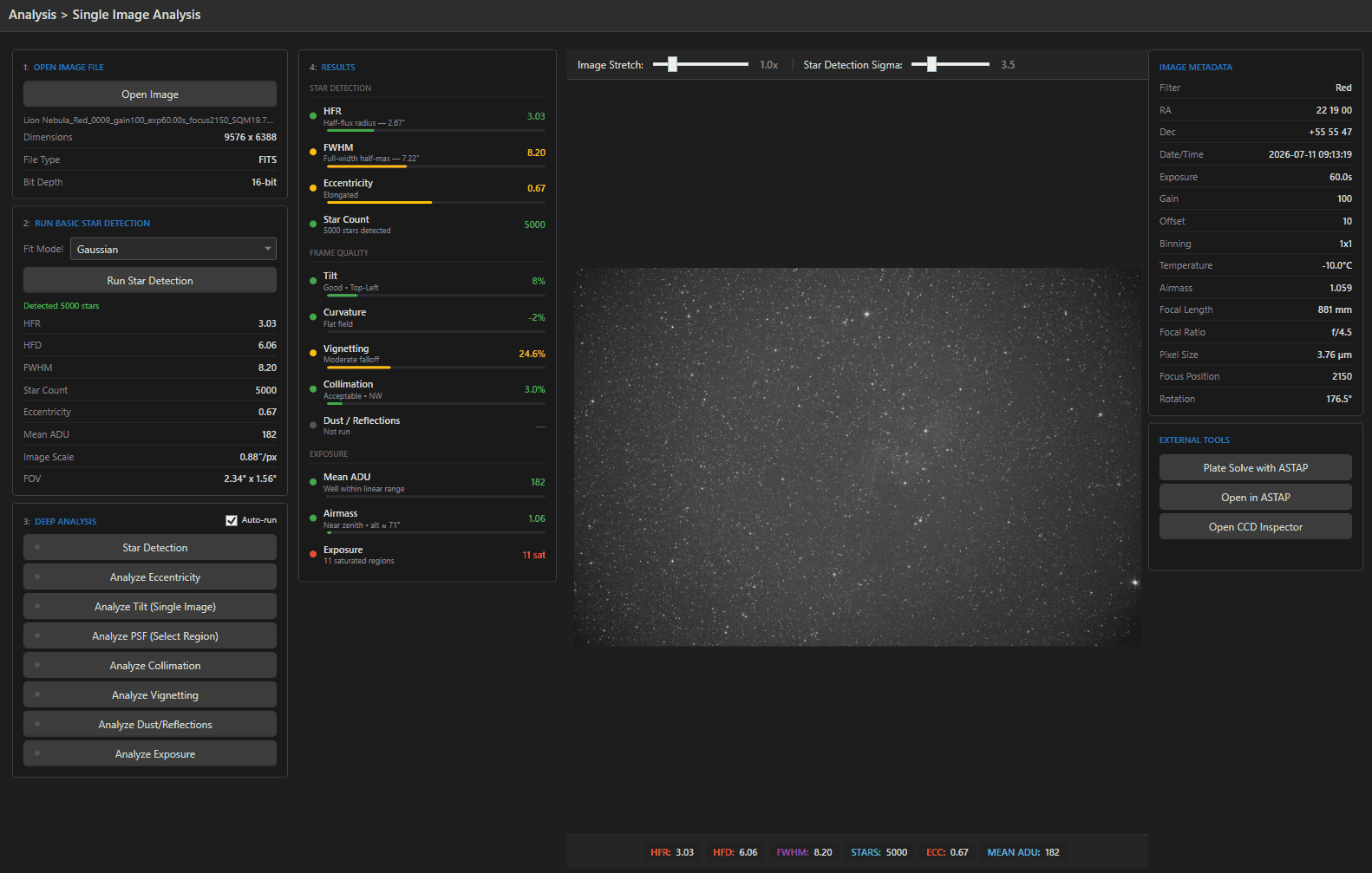
Open Image loads a FITS/XISF/TIFF (dimensions, file type, and bit depth shown). Choose a Fit Model – Gaussian (fast) or Moffat4 (more faithful to real star profiles; adds a Min R² fit-quality slider, default 0.60, to discard poor fits) – and run Star Detection. Results: HFR, HFD, FWHM, star count, eccentricity, mean ADU, plus image scale and field of view derived from the plate solve or the header’s focal length and pixel size.

Every deeper analysis builds on this step; an Auto-run checkbox runs the entire suite the moment detection finishes.
The Eight Analyses #

AnalysisWhat it measuresWhat the result means
Star DetectionHFR, FWHM, count, eccentricityoverall frame quality baseline
Eccentricitystar elongation across the frameguiding, wind, flexure issues
TiltHFR compared across a 3×3 zone gridfocus-plane tilt severity (%) and its direction – which corner is worst
PSF (Select Region)interactive point-spread function viewer3D intensity surface, directional radial profiles, HFR/FWHM rings for any star you select
Collimationeccentricity patterns and optical-center shifthow far the optical center sits from the geometric center
Vignettingbrightness in five concentric ringsedge falloff % plus horizontal/vertical profiles
Dust / Reflectionscircular dark and bright artifactseach found artifact circled and labeled, with an estimated distance from the sensor – which tells you which surface to clean
Exposurebackground statistics and saturationclipped stars, saturated area, background level vs. ideal

Each analysis paints its evidence onto the image: the tilt zone grid, vignetting rings, dust circles, PSF rings – you see the diagnosis, not just a number. Status dots track each analysis (gray = not run, green = done).

The Results Dashboard #

The dashboard column collects everything with progress-bar visualizations: star quality (HFR, FWHM, eccentricity, count), frame quality (tilt %, curvature, vignetting %, collimation shift, artifact count), and exposure (mean ADU, airmass when present). Hover any metric for the exact definition – e.g. tilt is (worst zone – best zone) / median HFR × 100.

Viewer & Annotation Tools #

The image viewer offers zoom (+/-, Fit, 1:1, mouse wheel; 10-500%), drag-to-pan, and a live cursor readout of pixel coordinates – plus RA/Dec once plate-solved. A Draw annotation mode lets you mark the image freehand in six colors (Yellow, Cyan, Lime, Red, Orange, White), with a clear button and label counter – handy for documenting an issue before posting it to a forum or sending it to us.

Metadata & External Tools #

The right column lists everything the header knows: filter, coordinates, date, exposure, gain/offset, binning, sensor temperature, airmass, focal length and ratio, pixel size, focus position, rotation. Below it, external integrations (configured in Settings):

  • Plate Solve with ASTAP – local solve; fills RA/Dec, rotation, and plate scale, and reports ASTAP’s own HFD/FWHM/star count for comparison.
  • Open in ASTAP – launches the full ASTAP GUI with the image.
  • Open CCD Inspector – hands the image to CCD Inspector if you use it.
Tip: Monthly ritual worth having: run the full suite on one good sub per rig. Tilt, collimation, and dust drift slowly – the dashboard catches them before they cost you a season’s data.
Updated on July 12, 2026
SubInspectorImage Annotator
Page Content
  • Loading & Star Detection
  • The Eight Analyses
  • The Results Dashboard
  • Viewer & Annotation Tools
  • Metadata & External Tools

Features

  • Equipment Library
  • Project Management
  • Sky View & Framing
  • Image Analysis
  • Calculators
  • SubInspector
  • NINA Plugin

Resources

  • Contact Us
  • Terms of Service
  • View Account
  • Discord Channel
  • Join Facebook

Get Started

Professional astrophotography project management software. Plan imaging sessions, manage equipment, analyze sub-frames, and sync targets to NINA — all in one workspace.

Download

© 2026 AstroPM

Terms of Use & Privacy Policy