
A project is one target on one rig, and the project editor is where its whole life is defined: identity and framing, scheduling constraints, charts and weather, and the exposure plan that drives every night. This page tours the editor section by section. The exposure grid’s full mechanics – counts, folders, syncing – get their own deep dive in Exposure Plans & Progress Tracking.
Target Information #

Identity and position: Target Name, Project Start Date, a Target Type (Galaxy, the nebula family, clusters, stars, comet, other), RA/Dec in h/m/s and °/′/″ fields, Rotation, read-only Field of View (calculated from the selected telescope and camera), catalog names, and a description.
Four helpers do the heavy lifting:
- Load from SkyView – pulls coordinates and rotation from your Sky View framing session.
- Load from Stellarium – imports the selected Stellarium object (when connected in Settings).
- Fetch SkyView – captures a survey snapshot at the entered coordinates through your rig’s FOV, becoming the project thumbnail.
- Edit Mosaic – the manual panel editor for multi-panel targets; see Mosaic Planning.
Target & Sky Parameters #

The scheduling constraints the engine must respect:
| Setting | Default | Meaning |
|---|---|---|
| Min Altitude (°) | 30 | below this, the target is never scheduled |
| Min Time on Target (hrs) | 1.0 | the smallest block worth slewing for |
| Twilight Type | Astronomical (-18°) | how dark counts as dark; Nautical (-12°) and Civil (-6°) available |
The Moon Avoidance block enables per-project moon rules: pick a named profile or edit the project’s own values (Separation, Width, Relax Scale, Min/Max Alt), manage profiles with Save / New / Rename / Del, and open the Chart to see the avoidance curve. Full theory and every parameter: Moon Avoidance.
Set as Default saves the current sky parameters as the app-wide defaults for future projects – tune once, inherit forever.
Target Image & Equipment Info #

Three switchable image slots per project: the SkyView Image (from Fetch SkyView), a Reference Image (paste with Ctrl+V or browse – someone else’s rendition for framing/processing reference), and your Final Image when the project completes. The equipment sidebar shows the rig at a glance – site, scope, camera, and pixel scale – plus research shortcuts: Search Web, View on Astrobin, View on Simbad.
Target Charts #


Two synchronized planning charts:
- Nightly – pick any date and see the target’s altitude through that night with toggleable series: Target Altitude, Rec. Exposure Hrs (the engine-driven green band), Moonless vs Moon hours, hours above your minimum altitude, and Dark Hours. A live site-time clock ticks along the top.
- Monthly – the season at a glance over 1, 3, 6, or 12 months. This is where you learn whether the project is a two-week sprint or an autumn-long campaign. More depth: Target Visibility & Charts.
Weather #
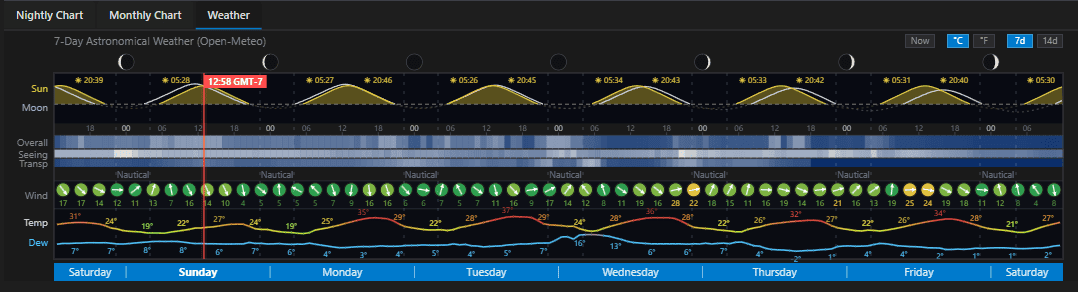
The Weather tab embeds the site’s full forecast – night-organized cloud, seeing, and transparency – right where you are deciding whether tonight is the night. Same engine as the site panel; see Weather Forecasting.
The Exposure Plan #
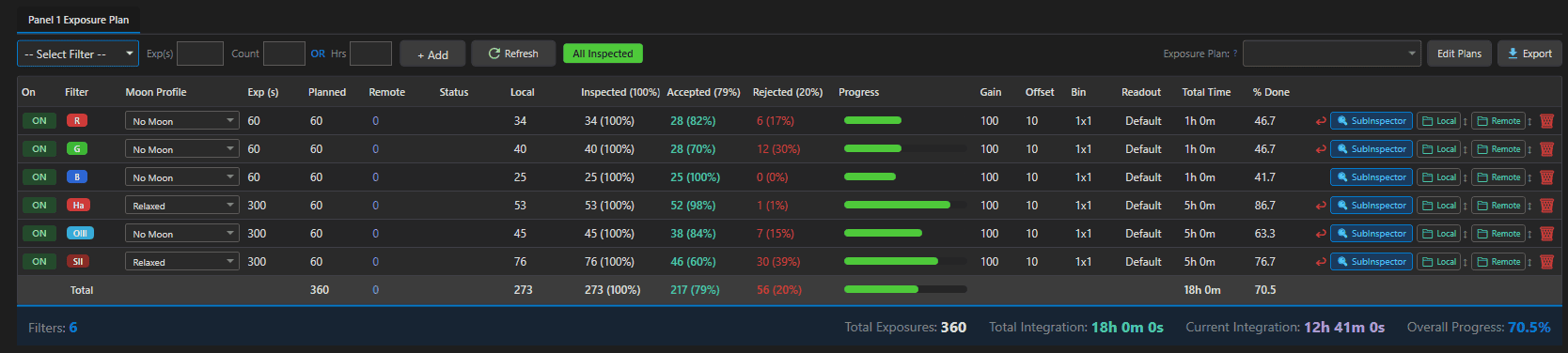
The bottom panel is the project’s contract with the night: one row per filter with exposure, planned count (enter a count or total hours – either derives the other), gain/offset/binning/readout, a per-row moon profile, and the On/Off toggle the scheduler honors. Mosaics get one plan per panel with a Copy to All Panels shortcut. The Exposure Plan selector applies a saved template; Edit Plans opens the builder; Export writes the project as CSV or JSON.
Everything else the grid does – the six live count columns, folder links, syncing, and the progress math – is the subject of Exposure Plans & Progress Tracking.
Sharing a Project #

Share Project exports a single .astropm file containing the project’s definition: target details, sky parameters, telescope/camera/site, filters, the full exposure plan, and the SkyView/reference/final images. Raw subs are not bundled – instead, optionally attach a share link to your cloud storage (Google Drive, OneDrive, Dropbox, iCloud, MEGA, Box, pCloud, or other) where the recipient can sync your captures.
On import, the recipient confirms equipment names (matching entries are reused, new ones created), picks a local folder for their sub storage, and gets the share link with copy/open buttons to set up their sync client – then points the project’s Remote folder at the synced location. Imported projects appear under the Shared status tab.
Cloud Push: When Projects Go to NINA #
Projects reach the observatory through the cloud, automatically:
- Auto-push fires on save when the project has coordinates, its status is Active, and auto-sync is enabled in Settings.
- What goes up: target and per-panel coordinates, rotation, the full exposure plan with progress counts, equipment context, priority, constraints, moon settings, and a ~500px thumbnail (re-sent only when the image changes).
- What comes down: moving a project off Active removes its cloud target; projects on disabled imaging systems are not synced; your license sets the cloud target limit.
Result: change anything in the editor, hit save, and the next NINA schedule build plans with it. No files to copy, no sequences to edit.