
Skip to content
  • Home
  • Astro PM Features
    • Equipment Management
    • Project Management
    • N.I.N.A. Automation
    • Sky View & Framing
    • Weather Forecast
    • SubInspector
    • Image Analysis
    • Calculators & Tools
  • Buy License
  • Resources
    • Documentation
    • View YouTube Channel
    • Join Discord Channel
    • Join Facebook Page
    • Contact Us
    • Account
  • Home
  • Astro PM Features
    • Equipment Management
    • Project Management
    • N.I.N.A. Automation
    • Sky View & Framing
    • Weather Forecast
    • SubInspector
    • Image Analysis
    • Calculators & Tools
  • Buy License
  • Resources
    • Documentation
    • View YouTube Channel
    • Join Discord Channel
    • Join Facebook Page
    • Contact Us
    • Account
Buy License
Download
Sign up for our Newsletter:

Installation & Setup

6
  • System Requirements & Download
  • Installing Astro PM on Windows
  • Activating Your License
  • First Launch Setup
  • Updating Astro PM
  • Cloud Sync & Your Sync Token

Astro PM App Guide

34
  • App Overview & Navigation
  • Astro PM Settings
  • Equipment Setup
    • Imaging Systems
    • Observing Sites
    • Telescopes
    • Cameras
    • Filters & Exposure Plans
    • Eyepieces
    • Sharing Equipment
  • Framing
    • Sky View & Framing
    • Surveys & Star Rendering
    • Overlays & Catalogs
    • Time Controls & Timeline
    • Exoplanet Targets & Transit Planning
  • Projects
    • Project Management
    • Creating Projects & Targets
    • Exposure Plans & Progress Tracking
    • Target Visibility & Charts
    • Moon Avoidance
    • Mosaic Planning
  • Community
    • Astro PM Gallery
    • Image of the Week
    • My Gallery Images
  • Weather
    • Weather Forecasting
  • NINA Tools
    • The Nightly Simulator
    • Scheduling Strategies
    • Managing Cloud Targets
  • Analysis Tools & Calculators
    • Image Analysis Tools Overview
    • SubInspector
    • Single Image Analysis Tools
    • Image Annotator
    • Sampling Calculator
    • Exposure Calculator
    • Focal Length Calculator

Astro PM NINA Guide

10
  • Installing the NINA Plugin
  • Connecting NINA to Astro PM
  • Astro PM Instructions Explained
  • Building Your Sequence
  • Offline & Vacation Mode
  • Playback Modes
  • The NINA Simulator Panel
  • Automated Flat Handling
  • Trigger Sets: Custom Instructions
  • NINA Troubleshooting

Astro PM Phone Guide

7
  • Installing the Phone App
  • Pairing Your Phone
  • Browsing Systems & Targets
  • Live Session Monitoring
  • The Weather Panel
  • Remote Pause & Resume
  • Phone App Troubleshooting
View Categories
  • Home
  • Docs
  • Astro PM App Guide
  • Equipment Setup
  • Telescopes

Telescopes

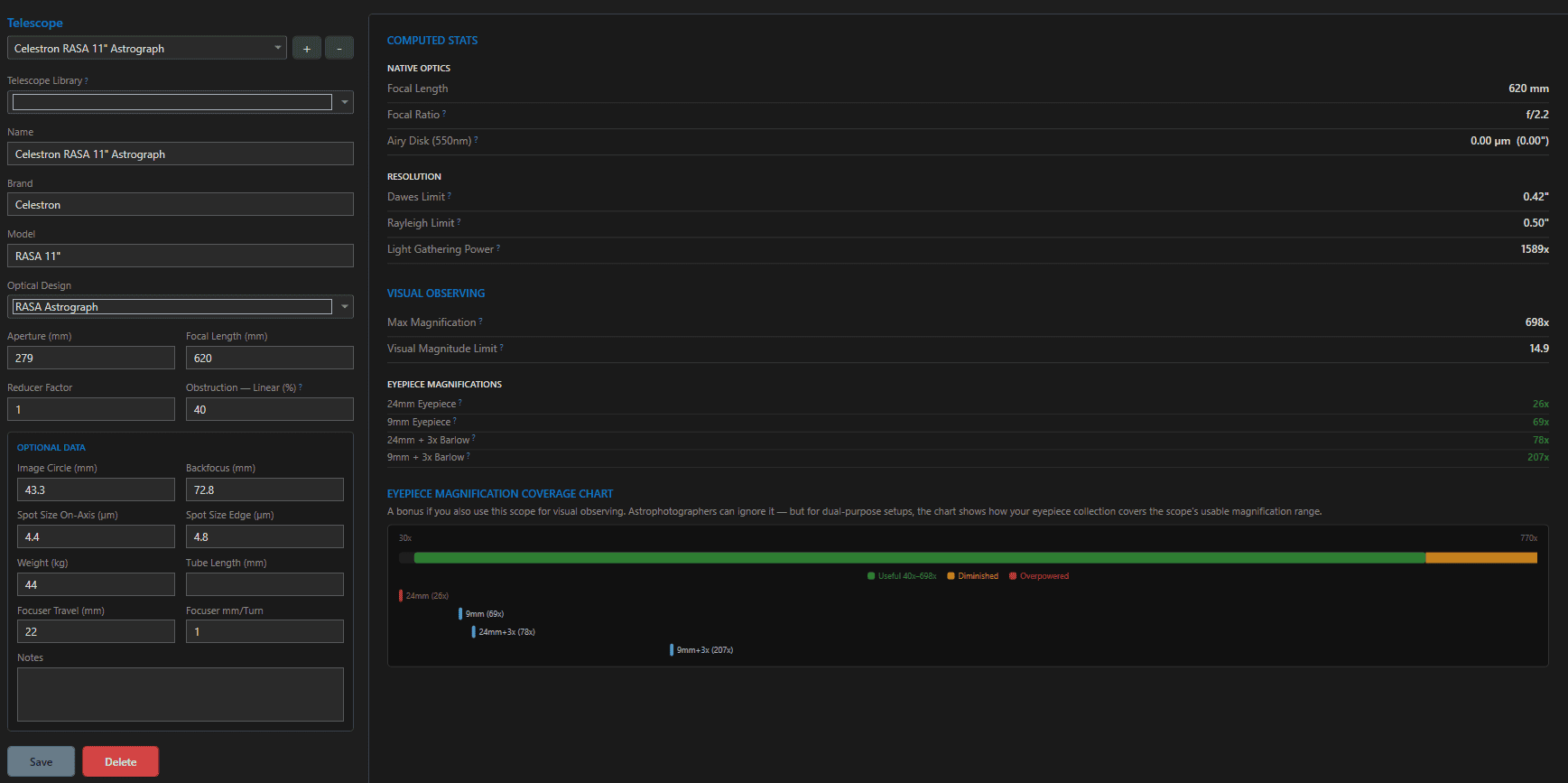
Two numbers – aperture and focal length – define most of what a telescope means to the rest of Astro PM: field of view, image scale, sampling, and light grasp all flow from them. The telescope editor captures those, the optical character around them, and the mechanical details worth keeping on record.

The Fields #

FieldNotes
Name / Brand / Modelyour display name is independent of brand/model, so “Dome A Main OTA” works fine
Optical DesignAchromat, Apochromat, Newtonian, Ritchey-Chrétien, SCT, Maksutov, CDK, Classical Cassegrain, RASA
Aperture (mm)the light bucket – drives flux and resolution figures
Focal Length (mm)the magnification side of every FOV and image-scale computation
Reducer Factor0 = none; e.g. 0.7 for a reducer – downstream calculations automatically use the reduced focal length
Obstruction (%)linear central obstruction; 0 for refractors, typically 25-45% for Newtonians and SCTs

Optional data – image circle, backfocus, on-axis/edge spot sizes, weight, tube length, focuser travel and mm/turn – stored for reference and used by the Focal Length Calculator where relevant.
The Telescope Library #

Adding a scope? Start typing in the Telescope Library picker and select your model – aperture, focal length, and design pre-fill from the built-in catalog. Everything remains editable afterward, so a tuned RC or a custom reducer setup is a two-second correction rather than a data-entry session.

Computed Stats #

The stats panel derives the optical character live as you type:

StatFormula
Focal ratio (native / reduced)FL / aperture; reduced FL / aperture
Airy disk @ 550nm2.44 × λ × f-ratio (µm and arcsec)
Dawes limit116 / aperture (arcsec)
Rayleigh limit138.4 / aperture (arcsec)
Light gathering power(aperture / 7)² vs. the dark-adapted eye

Where Telescope Data Is Used #

  • Focal length + reducer – image scale (206.265 × pixel size / FL) and FOV everywhere: Sky View’s framing rectangle, mosaic panel geometry, target thumbnails, the Sampling Calculator, and exposure math.
  • Aperture – photon flux in the Exposure Calculator, resolution limits, light grasp.
  • Design + backfocus + focuser specs – the Focal Length Calculator’s mirror-adjustment guidance.

A telescope is one third of every Imaging System. Correct a focal length and every FOV rectangle, sampling figure, and framing preview updates immediately across all projects on rigs using that scope – deletion is blocked while anything references it.

Tip: If you image with and without a reducer, create two telescope entries (e.g. “EdgeHD 8” and “EdgeHD 8 + 0.7x”) and pair each with its own Imaging System – schedules, framing, and progress stay cleanly separated per optical configuration.
Updated on July 12, 2026
Observing SitesCameras
Page Content
  • The Fields
  • The Telescope Library
  • Computed Stats
  • Where Telescope Data Is Used

Features

  • Equipment Library
  • Project Management
  • Sky View & Framing
  • Image Analysis
  • Calculators
  • SubInspector
  • NINA Plugin

Resources

  • Contact Us
  • Terms of Service
  • View Account
  • Discord Channel
  • Join Facebook

Get Started

Professional astrophotography project management software. Plan imaging sessions, manage equipment, analyze sub-frames, and sync targets to NINA — all in one workspace.

Download

© 2026 AstroPM

Terms of Use & Privacy Policy