
Skip to content
  • Home
  • Astro PM Features
    • Equipment Management
    • Project Management
    • N.I.N.A. Automation
    • Sky View & Framing
    • Weather Forecast
    • SubInspector
    • Image Analysis
    • Calculators & Tools
  • Buy License
  • Resources
    • Documentation
    • View YouTube Channel
    • Join Discord Channel
    • Join Facebook Page
    • Contact Us
    • Account
  • Home
  • Astro PM Features
    • Equipment Management
    • Project Management
    • N.I.N.A. Automation
    • Sky View & Framing
    • Weather Forecast
    • SubInspector
    • Image Analysis
    • Calculators & Tools
  • Buy License
  • Resources
    • Documentation
    • View YouTube Channel
    • Join Discord Channel
    • Join Facebook Page
    • Contact Us
    • Account
Buy License
Download
Sign up for our Newsletter:

Installation & Setup

6
  • System Requirements & Download
  • Installing Astro PM on Windows
  • Activating Your License
  • First Launch Setup
  • Updating Astro PM
  • Cloud Sync & Your Sync Token

Astro PM App Guide

34
  • App Overview & Navigation
  • Astro PM Settings
  • Equipment Setup
    • Imaging Systems
    • Observing Sites
    • Telescopes
    • Cameras
    • Filters & Exposure Plans
    • Eyepieces
    • Sharing Equipment
  • Framing
    • Sky View & Framing
    • Surveys & Star Rendering
    • Overlays & Catalogs
    • Time Controls & Timeline
    • Exoplanet Targets & Transit Planning
  • Projects
    • Project Management
    • Creating Projects & Targets
    • Exposure Plans & Progress Tracking
    • Target Visibility & Charts
    • Moon Avoidance
    • Mosaic Planning
  • Community
    • Astro PM Gallery
    • Image of the Week
    • My Gallery Images
  • Weather
    • Weather Forecasting
  • NINA Tools
    • The Nightly Simulator
    • Scheduling Strategies
    • Managing Cloud Targets
  • Analysis Tools & Calculators
    • Image Analysis Tools Overview
    • SubInspector
    • Single Image Analysis Tools
    • Image Annotator
    • Sampling Calculator
    • Exposure Calculator
    • Focal Length Calculator

Astro PM NINA Guide

10
  • Installing the NINA Plugin
  • Connecting NINA to Astro PM
  • Astro PM Instructions Explained
  • Building Your Sequence
  • Offline & Vacation Mode
  • Playback Modes
  • The NINA Simulator Panel
  • Automated Flat Handling
  • Trigger Sets: Custom Instructions
  • NINA Troubleshooting

Astro PM Phone Guide

7
  • Installing the Phone App
  • Pairing Your Phone
  • Browsing Systems & Targets
  • Live Session Monitoring
  • The Weather Panel
  • Remote Pause & Resume
  • Phone App Troubleshooting
View Categories
  • Home
  • Docs
  • Astro PM App Guide
  • Equipment Setup
  • Sharing Equipment

Sharing Equipment

Careful equipment entry is real work – sensor specs, gain modes, filter details. The Share Equipment page lets that work travel: bundle observatories, telescopes, and cameras into a single .astropmeq file that any Astro PM user can import into their own library, ready to use across projects, Sky View, and the calculators.

The Share Equipment Page #

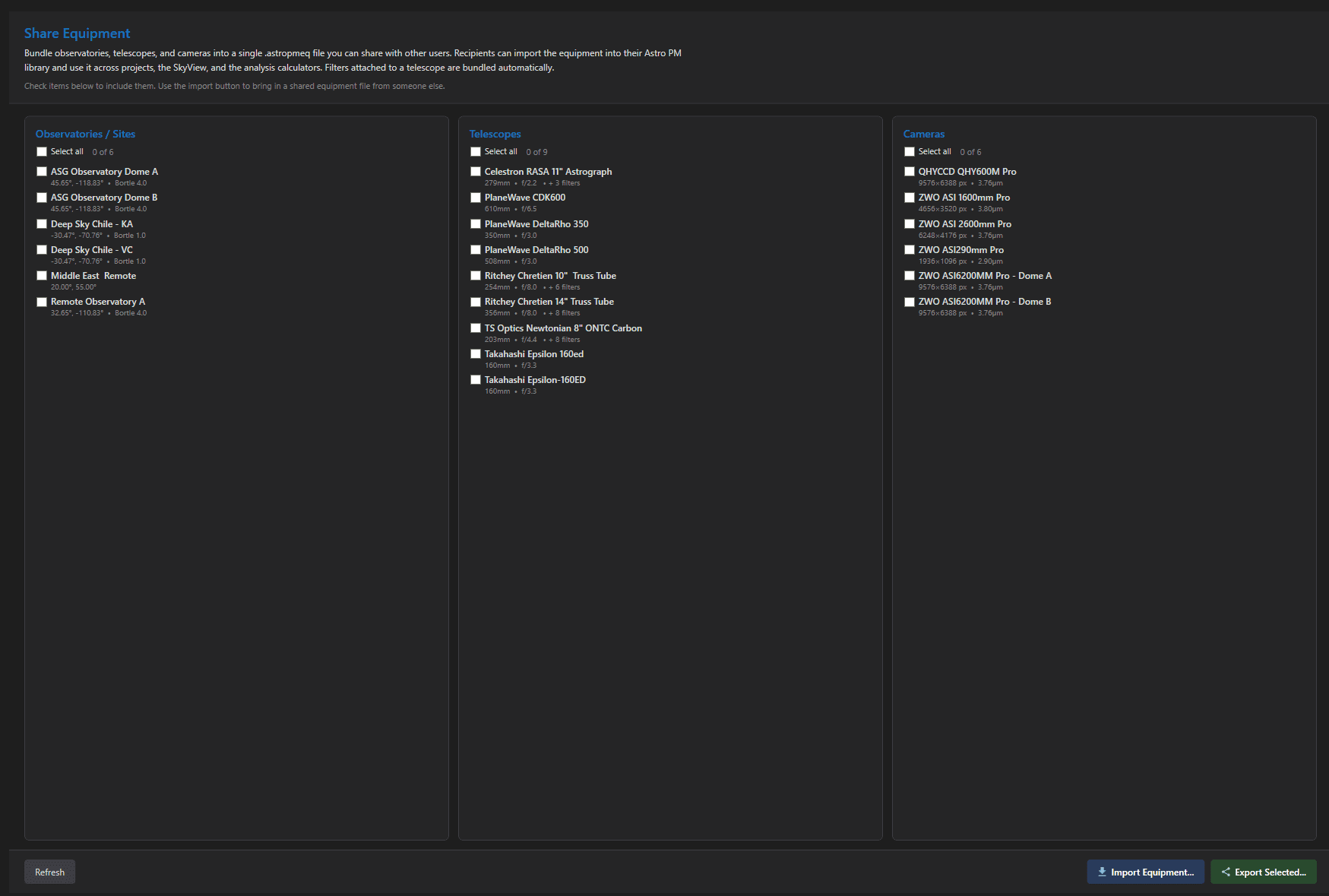
The page shows your library in three columns – Observatories / Sites, Telescopes, and Cameras – each with per-item checkboxes, a Select All shortcut, and a live count of what you have selected. Check exactly what you want to share; each entry shows its name plus a detail line so similar items are easy to tell apart. A Refresh button re-reads the library if you have been editing equipment in another tab.
What Goes in the File #

Export Selected writes everything needed to recreate the equipment faithfully:

  • Sites – the full site definition (coordinates, elevation, Bortle, time zone).
  • Telescopes – complete optical and mechanical specs.
  • Cameras – sensor geometry, the default gain mode, and the full gain modes and readout modes lists, so the recipient’s Exposure Calculator and NINA integration work exactly like yours.
  • Filters – bundled automatically: any filter attached to an included telescope rides along with it, no separate selection needed.

The file itself is a compact archive with a manifest (what is inside, counts, when it was made) – safe to email, post to a club forum, or drop in a shared drive.

Importing a Shared File #

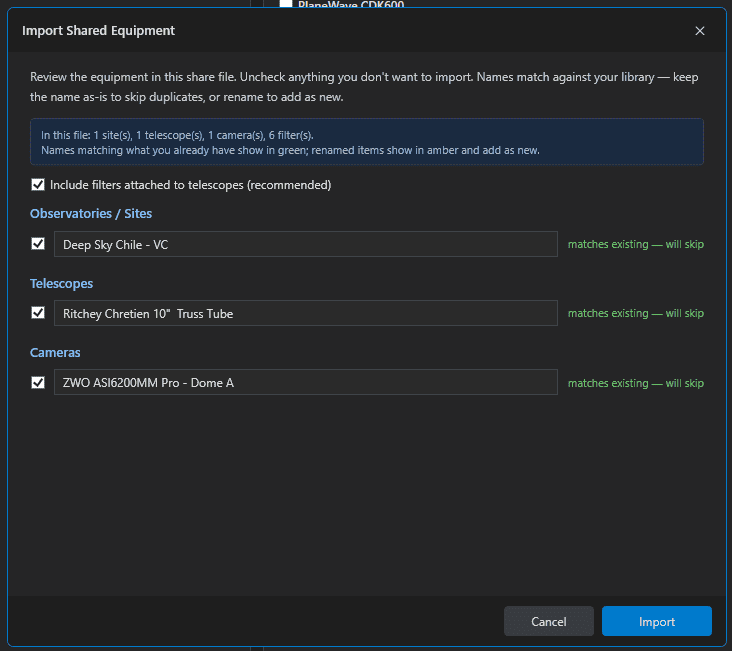
Click Import Equipment…, pick the .astropmeq file, and a preview dialog lists everything inside before anything touches your library:

  • Each site, telescope, and camera appears as a row with an Include checkbox and an editable name.
  • Rows whose names match equipment you already have show in green with the status “matches existing – will skip” – imports never overwrite or duplicate your entries.
  • Want the shared version anyway? Rename the row (it turns amber, “adding new”) and it imports as a separate entry alongside yours.
  • An Include Filters toggle controls whether the bundled filters come along. Filters are matched per telescope – a renamed scope imports with its complete filter set, while a scope you already own only gains filters it did not have.

After the import, a summary reports what was added and what was skipped.
Ways to Use It #

  • Club and community sharing – one member enters the popular scope/camera combos properly once; everyone imports.
  • New computer, instant library – export everything on the old machine, import on the new one, and your equipment definitions arrive intact.
  • Shared observatories – the site owner exports the site + resident rigs; every user of the facility plans against identical, correct specs.
  • Helping a friend get started – a properly filled camera entry (real read noise, gain modes, QE) is one of the best onboarding gifts you can give a new Astro PM user.
Tip: After importing shared equipment, assemble it into an Imaging System – that is what projects, the simulator, and NINA actually select. The share brings the parts; the rig is yours to name.
Updated on July 12, 2026
EyepiecesImaging Systems
Page Content
  • The Share Equipment Page
  • What Goes in the File
  • Importing a Shared File
  • Ways to Use It

Features

  • Equipment Library
  • Project Management
  • Sky View & Framing
  • Image Analysis
  • Calculators
  • SubInspector
  • NINA Plugin

Resources

  • Contact Us
  • Terms of Service
  • View Account
  • Discord Channel
  • Join Facebook

Get Started

Professional astrophotography project management software. Plan imaging sessions, manage equipment, analyze sub-frames, and sync targets to NINA — all in one workspace.

Download

© 2026 AstroPM

Terms of Use & Privacy Policy