
SNR Efficiency mode tells you how long each sub should be. Target SNR (surface brightness) mode answers the next question: how many hours in total will this target need? Give it the object’s surface brightness and the SNR you want, and it forecasts the per-pixel stacked SNR your rig builds up over the night – and how far your sky is working against you. Shared inputs (equipment, gain mode, sky quality, filter, sub length, binning) are described in Exposure Calculator.
Inputs #
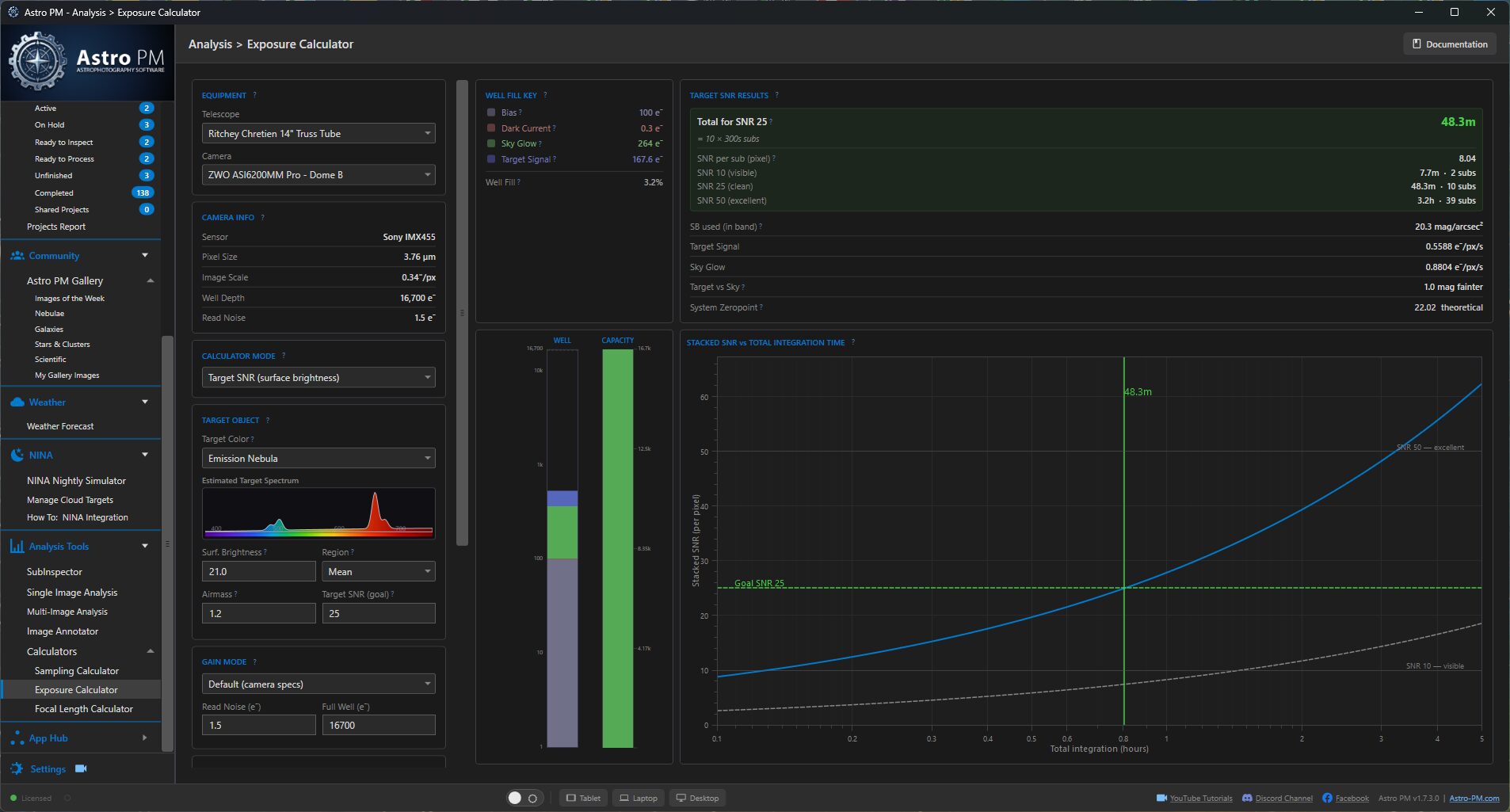
Select Target SNR (surface brightness) under CALCULATOR MODE. The TARGET OBJECT section replaces Target Type and Target Flux, and the FWHM box is hidden (an extended object’s per-pixel signal does not depend on seeing).
| Input | Default | What it does |
|---|---|---|
| Target Color | Emission Nebula | What kind of light the object emits. Seeds a class-typical surface brightness and sets the spectrum used to transform it into your filter’s band. The Estimated Target Spectrum preview shows where each type is strongest. |
| Surf. Brightness | 21.0 | Mean surface brightness in mag/arcsec². Type your target’s real value when you know it (HyperLeda for galaxies, published values, your own subs) – a typed value survives changing the type. |
| Region | Mean | Bright core (−2.0), Mean, or Faint detail (+1.5) – shifts the mean toward the part you care about (a galaxy’s core is magnitudes brighter than its outer arms). |
| Airmass | 1.2 | Dims the signal through the extinction coefficient. |
| Target SNR (goal) | 25 | The per-pixel stacked SNR you want. ~5 barely detectable, ~10 clearly visible, ~25 clean for processing, ~50 smooth and stretch-hard. |
| Target Color | Typical SB (mag/arcsec²) |
|---|---|
| Emission Nebula | 21.0 |
| Supernova Remnant | 22.5 |
| Planetary Nebula | 18.5 |
| Nebula (mixed) | 21.5 |
| Dark Nebula | 23.0 |
| Reflection Nebula | 22.0 |
| IFN / Galactic Cirrus | 25.5 |
| Galaxy | 22.0 |
| Globular Cluster | 20.0 |
| Open Cluster | 20.5 |
| Comet (gas + dust) | 21.0 |
Emission types (emission nebulae, supernova remnants, planetaries) concentrate their light in a few lines; continuum types spread it like starlight of a characteristic colour – galaxies reddish, reflection nebulae blue. That drives how the time splits between R, G and B. Luminance forecasts are unaffected.
Reading the Forecast #
| Result | Meaning |
|---|---|
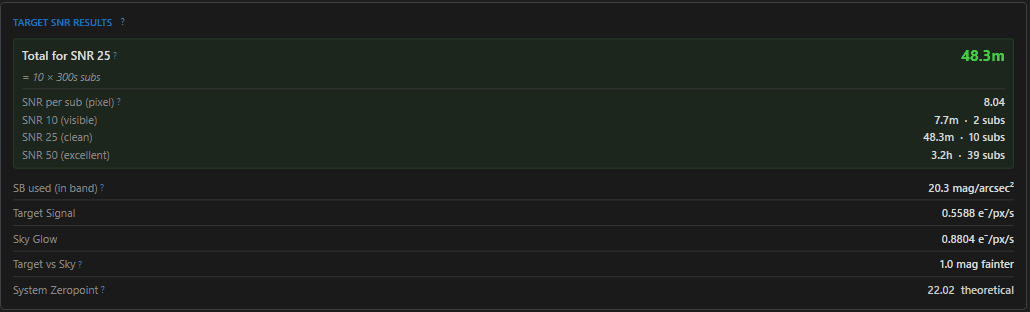
| Total for SNR 25 | The headline: hours of stacked subs (at your Sub-Exposure length) to reach the goal, with the sub count. The label follows your goal. |
| SNR per sub (pixel) | Per-pixel SNR of one sub. Below ~0.5 the object is invisible in a single frame – normal for faint targets; the stack is what counts. |
| SNR 10 (visible), SNR 25 (clean), SNR 50 (excellent) | Time and sub count for each milestone. |
| SB used (in band) | The surface brightness after the Region offset and the colour transform into your band – what every other number is computed from. |
| Target Signal, Sky Glow | Per-pixel rates from the target and the sky. |
| Target vs Sky | How many magnitudes fainter than your sky the target is (negative = brighter). Each magnitude fainter costs roughly 6× the integration – the single number that explains why dark skies and narrowband exist. |
| System Zeropoint | Always theoretical in this mode (see below). |
The STACKED SNR vs TOTAL INTEGRATION TIME chart shows the growth curve with the 10 (visible) and 50 (excellent) levels marked. Stacked SNR grows with the square root of time: doubling the SNR costs four times the hours.
Limits of the Model #
Careful: Catalog surface brightness is a broadband (V) number. Through a narrowband filter a real emission line passes almost whole, but the model spreads the flux as continuum and keeps only the sliver in band – so narrowband forecasts here are strongly pessimistic for emission targets. The panel shows a warning when you combine the two.
Measured star zeropoints are deliberately not applied in this mode. They are point-source calibrations and would overstate extended-object times enormously; instead, the target and the sky go through the same theoretical band model, so their contrast – which drives the answer – stays honest. Treat absolute hours as planning estimates; comparisons between filters, sites and targets are the strong suit.
Check It Against Your Own Subs #
Open a single sub of the target in Single Image Analysis and right-click-and-hold on the region you care about. The loupe’s SNR/PX is directly comparable with SNR per sub (pixel), and SIG e⁻/px/s with the forecast’s Target Signal. If your real sub reads higher or lower, nudge Surf. Brightness until the per-sub SNR matches – the total-time forecast is then calibrated to your target, rig and sky.
Tip: Use Target SNR mode to decide how to split a season: compare the hours a faint IFN field needs from your backyard against a bright emission target, or check what moving to a darker site would save.